PDF to JPG,
free and offline.
Drop a PDF in. Every page comes out as a JPG you can grab one at a time, or all together as a zip.
Drop a PDF here, or click to choose one
Nothing leaves your device
Contact sheet
PDF to JPG Free – Convert PDF Pages to Images Online
Need to turn a PDF document into JPG images? Our PDF to JPG free online tool makes it simple to convert PDF pages into high-quality JPG images directly from your browser. You don’t need complicated software or advanced technical knowledge.
Whether you want to convert a single PDF page, extract images from a document, create image previews, or share a PDF page as an image, a PDF to JPG free converter can save you time and effort.
Our online tool is designed to be fast, simple, mobile-friendly, and easy to use. Upload your PDF, convert the pages, and download the resulting JPG images.
What Is a PDF to JPG Converter?
A PDF to JPG converter is an online tool that changes PDF pages into JPG image files. A PDF can contain text, images, graphics, tables, and other content. Converting the document to JPG allows each PDF page to be viewed and shared as a regular image.
For example, if your PDF contains five pages, the converter can create five JPG images—one image for each page.
The PDF to JPG free tool is useful when you need to:
- Convert PDF pages into JPG images
- Share PDF pages on social media
- Create image previews of PDF documents
- Use PDF pages in presentations
- Upload a PDF page to websites that accept images
- Save individual PDF pages as pictures
- Quickly view document pages as images
How to Use PDF to JPG Free
Converting a PDF into JPG images should not require complicated steps. With our online pdf to jpg free tool, the process is straightforward.
Step 1: Upload Your PDF
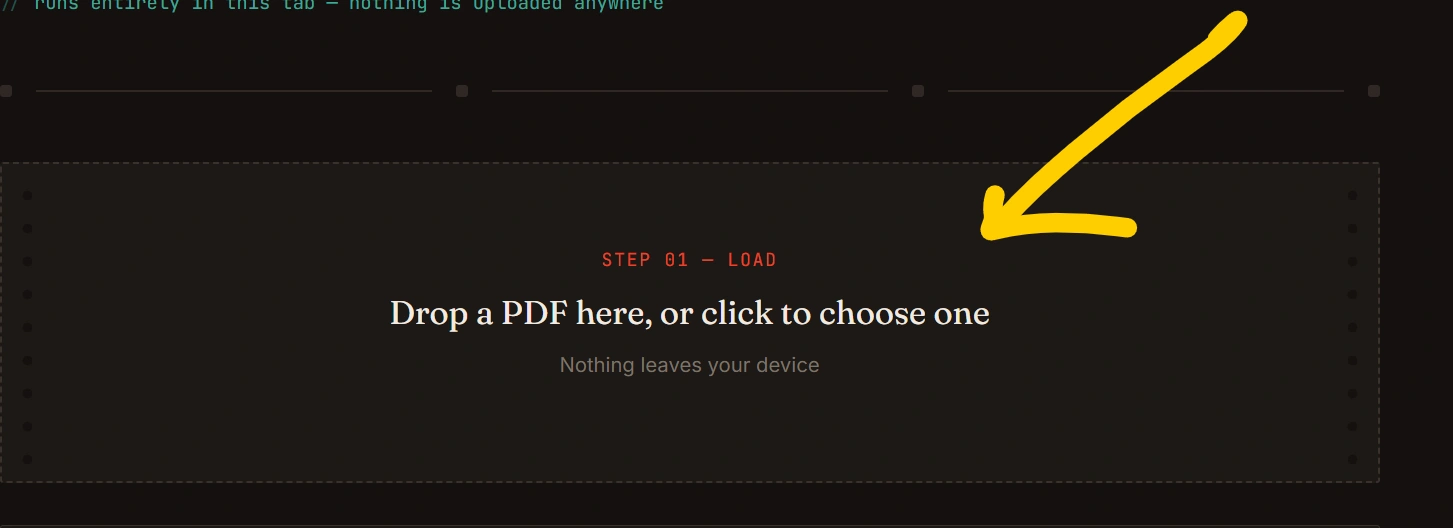
Open the PDF to JPG converter and select the PDF file you want to convert. You can upload your document directly from your computer or mobile device.
Step 2: Start the Conversion
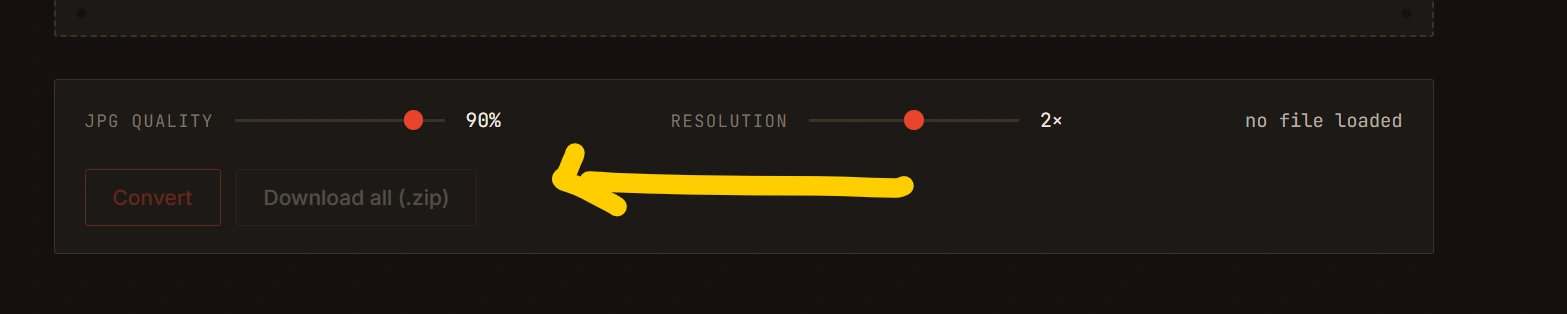
Click the Convert to JPG button. The tool processes your PDF and converts its pages into JPG images.
Step 3: Preview the Results
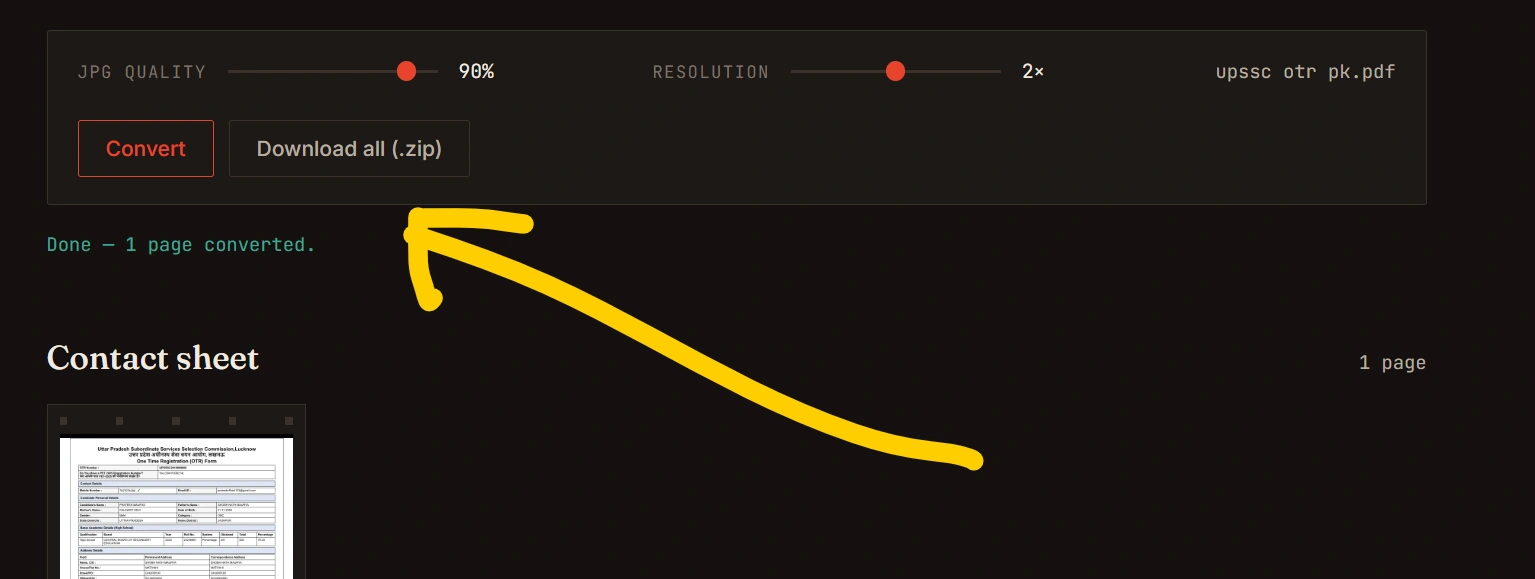
After processing, you can check the generated JPG images to make sure the conversion looks correct.
Step 4: Download Your JPG Images
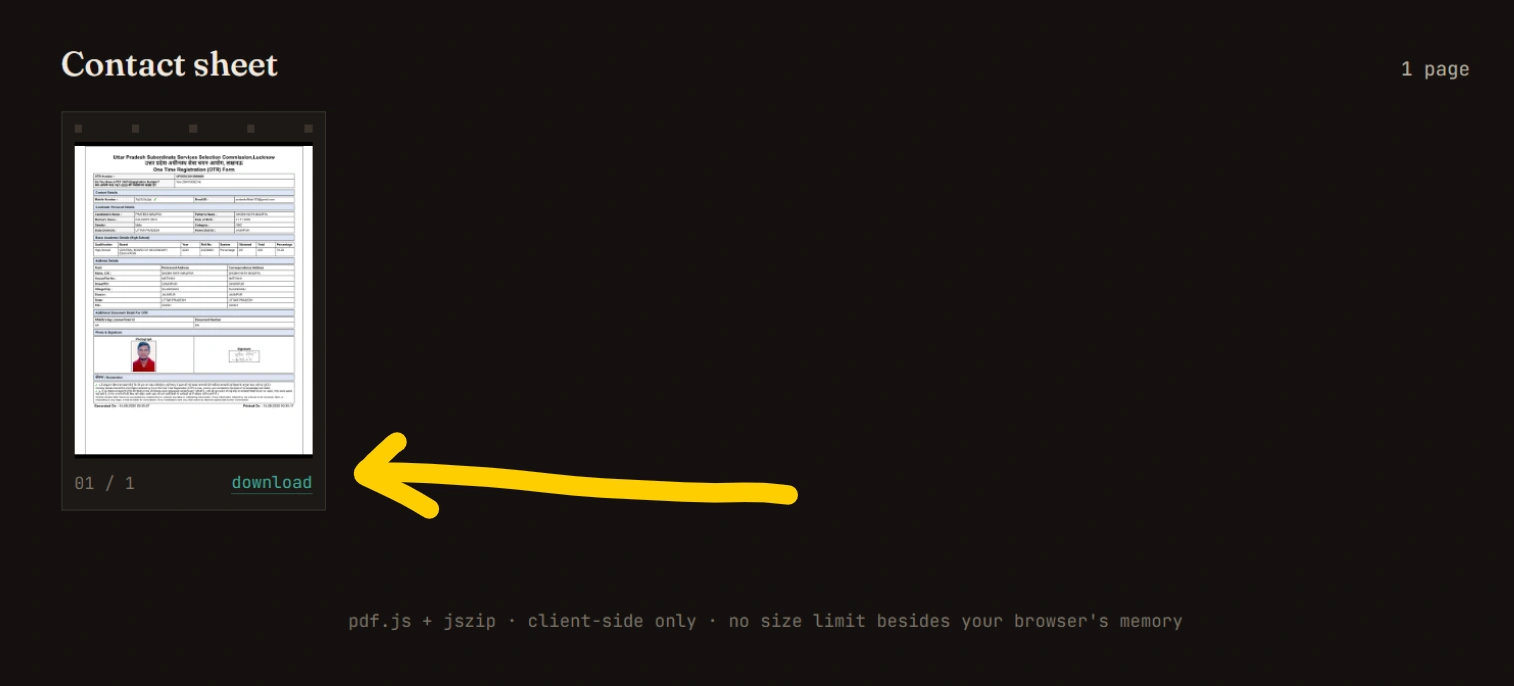
Download the converted JPG files to your device. If your PDF contains multiple pages, each page can be provided as a separate JPG image.
Why Use a PDF to JPG Free Online Tool?
There are several reasons people choose an online PDF converter instead of installing desktop software.
1. Free to Use
A pdf to jpg free online converter lets you convert PDF documents without purchasing expensive software.
2. No Installation Required
You can use the converter directly in your web browser. There is no need to install additional programs.
3. Easy for Beginners
The interface can be designed with simple buttons such as Upload PDF, Convert, Preview, and Download, making the process easy for everyone.
4. Works on Different Devices
A browser-based PDF converter can work on computers, laptops, tablets, and smartphones.
5. Fast Conversion
For normal PDF files, conversion can be completed quickly, allowing you to get your JPG images without unnecessary steps.
PDF to JPG Free vs. PDF to Image
The terms PDF to JPG and PDF to image are often used interchangeably, but JPG is specifically an image format.
When you convert PDF to JPG, every PDF page can become a JPG image. JPG is widely supported by browsers, image editors, social platforms, and many other applications.
For example:
PDF → Page 1 → JPG
PDF → Page 2 → JPG
PDF → Page 3 → JPG
This makes it convenient to work with individual pages instead of the entire PDF document.
What Is JPG?
JPG, also written as JPEG, is one of the most widely used image formats on the internet. It uses compression to reduce image file size while maintaining reasonable visual quality.
JPG files are commonly used for:
- Photos
- Website images
- Document previews
- Social media images
- Digital documents
- Online uploads
Because JPG is supported by almost every modern device and browser, converting PDF pages to JPG can make documents easier to use in image-based workflows.
Who Can Use a PDF to JPG Free Converter?
A free PDF-to-JPG tool can be useful for many different users.
Students
Students can convert pages from notes, assignments, and study materials into JPG images for quick sharing or reference.
Teachers
Teachers can turn PDF worksheets or individual document pages into images for presentations and online classes.
Office Workers
Office users can convert specific PDF pages into images when they need to insert document content into presentations or reports.
Designers
Designers can convert PDF references or document pages into image files for use in design workflows.
Bloggers and Website Owners
Bloggers can convert selected PDF pages into JPG images when they need visual previews for articles or webpages.
Everyday Users
Anyone who needs to quickly turn a PDF page into an image can use an online PDF to JPG free converter.
Is PDF to JPG Free Safe?
When using any online file conversion service, users should pay attention to privacy and security.
For sensitive documents, always check how the website handles uploaded files. A trustworthy converter should clearly explain its file-processing and deletion policies.
Avoid uploading highly confidential documents to an unfamiliar website unless you understand how the service handles your files.
If your PDF contains sensitive information, consider using a tool that performs processing locally in the browser when possible.
PDF to JPG Free on Mobile
You don’t necessarily need a computer to convert PDF files to JPG. A responsive web-based pdf to jpg free converter can be accessed through a smartphone browser.
The basic process is the same:
- Open the PDF to JPG tool.
- Select your PDF file.
- Start conversion.
- Wait for processing.
- Preview the JPG images.
- Download the converted files.
A mobile-friendly interface makes PDF conversion more convenient when you’re away from your computer.
Benefits of Converting PDF to JPG
Converting a PDF document into JPG images provides several practical benefits.
Easy sharing: JPG images can be shared through many platforms and messaging applications.
Simple viewing: Users can open JPG files using almost any device without needing a dedicated PDF reader.
Easy embedding: JPG images can be inserted into presentations, websites, documents, and graphics.
Individual pages: Multi-page PDFs can be converted into separate images, allowing you to work with specific pages.
Wide compatibility: JPG is supported by virtually all modern operating systems and browsers.
Frequently Asked Questions
How can I convert PDF to JPG free?
Upload your PDF to a PDF to JPG free online converter, start the conversion, and download the resulting JPG images.
Can I convert multiple PDF pages to JPG?
Yes. A PDF-to-JPG converter can convert individual pages of a multi-page PDF into separate JPG images.
Do I need to install software?
No. An online PDF-to-JPG converter can work directly through your web browser.
Can I use PDF to JPG free on my phone?
Yes. If the tool is mobile-friendly, you can use it through a smartphone or tablet browser.
What is the difference between PDF and JPG?
PDF is primarily a document format designed to preserve document layout, while JPG is an image format commonly used for photographs and graphics.
Will converting PDF to JPG change the file?
Yes. The output is an image representation of the PDF page rather than an editable PDF document.
Can I convert a scanned PDF to JPG?
Yes. Scanned PDF pages can generally be converted into JPG images because each page can be rendered as an image.
Why Choose Our PDF to JPG Free Tool?
Our goal is to make PDF conversion straightforward for everyone. Instead of dealing with complicated desktop applications, you can use a simple browser-based tool to convert your documents.
The PDF to JPG free tool focuses on:
- ⚡ Fast PDF conversion
- 🆓 Free online access
- 📱 Mobile-friendly design
- 💻 Browser-based functionality
- 🖼️ High-quality JPG output
- 🎯 Simple user interface
- 🔄 Easy PDF-to-image conversion
Whether you’re converting one page or a complete document, the tool is designed to provide a convenient PDF-to-image experience.
Final Thoughts
A PDF to JPG free converter is a useful solution when you need to transform PDF pages into easy-to-share image files. Instead of installing specialized software, you can use an online tool directly from your browser.
From students and teachers to office workers, designers, bloggers, and everyday users, converting PDF pages to JPG can make documents easier to share, display, and reuse.
Upload your PDF, convert it to JPG, and download your images—all from your browser with our free PDF to JPG tool.