Increase Image Size to 50KB
Many forms require a photo of at least 50KB. Upload an image below and this pads it up to that size (or a size you choose) without changing how it looks. Runs entirely in your browser — nothing is uploaded anywhere.
Increase Image Size to 50KB Online
Sometimes an image needs to meet a specific file-size requirement, such as 50KB, before it can be uploaded to a website, online application, examination form, government portal, or document submission system. If your image is smaller than the required size, you may need to increase image size to 50KB without making the image unnecessarily large.
Our Increase Image Size to 50KB web tool makes this process simple. You can upload an image, adjust its file size, and create an image that is approximately 50KB directly from your browser.
There is no need to install complicated image-editing software. The tool is designed for users who need a quick and straightforward way to change image file size.
What Is the Increase Image Size to 50KB Tool?
The Increase Image Size to 50KB tool is an online utility that helps users increase the file size of an image when the original image is below the required size.
For example, suppose you have an image that is only 25KB, but an online application requires an image of around 50KB. Instead of manually experimenting with different image settings, you can use the tool to target a file size of approximately 50KB.
The tool can be useful for JPG, JPEG, PNG, and other commonly supported image formats, depending on the formats supported by your website implementation.
How to Increase Image Size to 50KB Online
Using the tool is easy and generally requires only a few steps.
Step 1: Upload Your Image
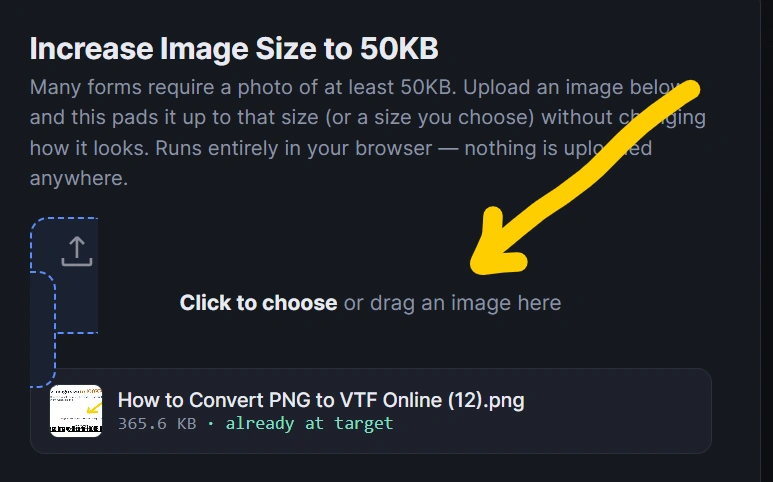
Open the Increase Image Size to 50KB tool and select the image you want to modify from your device.
Step 2: Select 50KB
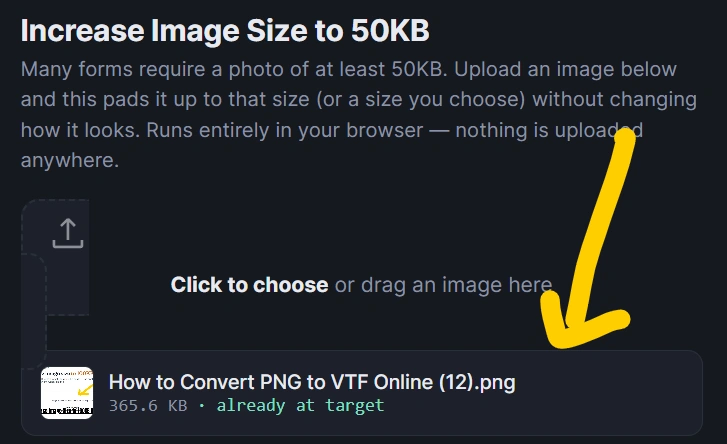
Choose 50KB as your target file size. The tool will process the image according to the selected size.
Step 3: Process the Image
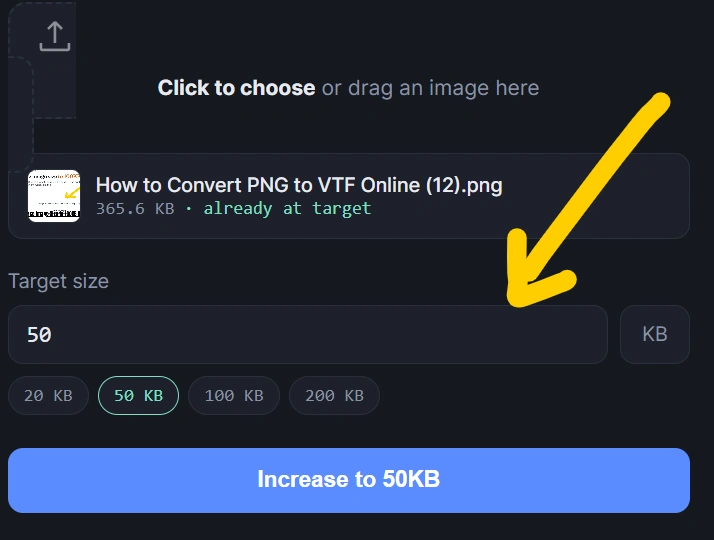
Click the appropriate resize, convert, or process button. The tool will adjust the image’s file characteristics to reach the requested size as closely as possible.
Step 4: Download the Image
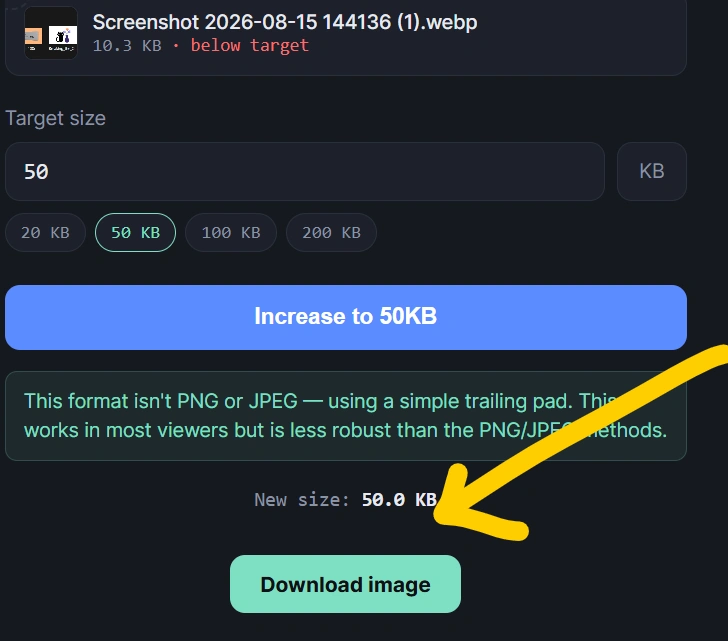
Once processing is complete, preview the resulting image and download it to your device.
The entire process can be performed online without requiring additional desktop software.
Why Increase an Image to 50KB?
There are several situations where you may need an image close to 50KB.
Online Application Forms
Some application forms specify minimum or maximum image-size requirements. If your image is smaller than the minimum requirement, increasing it to approximately 50KB may help satisfy the requirement.
Government Forms
Government websites and online application portals sometimes specify particular image dimensions or file-size limits. A tool for increase image size to 50KB can help prepare your image before uploading it.
Exam Applications
Students may need to upload photographs, signatures, or documents while completing examination forms. If the portal requires a particular file size, adjusting the image beforehand can make the upload process easier.
Job Applications
Recruitment websites may have specific requirements for profile photographs, signatures, or supporting documents. Preparing an image around 50KB can help when a website specifies a minimum or target file size.
Document Uploads
Some websites restrict uploads based on file size. If an image is significantly smaller than the requested size, you can use an image-size tool to prepare it.
Can You Really Increase an Image File Size?
Yes. Image file size is affected by more than the visible dimensions of an image.
Factors such as:
- Image dimensions
- JPEG quality
- Compression level
- Image format
- Metadata
- Color information
- Encoding settings
can affect the final file size.
For example, two images with the same width and height can have very different file sizes because they may use different compression settings.
Therefore, increasing the file size does not necessarily mean simply making the image physically larger.
Increase Image Size Without Changing Its Dimensions
One common misconception is that increasing an image’s file size always requires increasing its width and height.
That is not necessarily true.
A properly designed Increase Image Size to 50KB tool can adjust compression and encoding parameters to increase the file size while keeping the image dimensions unchanged.
This can be particularly useful when an application requires both:
- Specific image dimensions
- A particular file-size range
Changing dimensions unnecessarily could make the image unsuitable for the application.
Increase JPG Image Size to 50KB
JPG and JPEG images are widely used for photographs because they generally provide good visual quality with relatively small file sizes.
If your JPG image is only 20KB or 30KB and you need an image around 50KB, you can use the Increase Image Size to 50KB tool to adjust its encoding or quality settings.
For example:
Original: 28KB JPG
Target: 50KB
Result: Approximately 50KB JPG
The exact resulting size can vary because image compression depends on the content and encoding characteristics of the image.
Increase PNG Image Size to 50KB
PNG files are commonly used for graphics, screenshots, logos, icons, and images requiring transparency.
If a PNG image is smaller than the required size, the tool can help prepare a file closer to the 50KB target.
However, PNG compression behaves differently from JPEG compression. Therefore, reaching an exact file size may require a different processing approach depending on the image.
50KB Image Size Requirements
When a website says that an image should be 50KB, it is important to check whether it means:
- Exactly 50KB
- Maximum 50KB
- Less than 50KB
- Minimum 50KB
- Approximately 50KB
These requirements are different.
For example, if a website says “image must be less than 50KB,” creating a 55KB image would not satisfy the requirement.
On the other hand, if the requirement says “minimum 50KB,” an image of 45KB may not be accepted.
Always check the instructions provided by the website or application portal.
Increase Image Size to 50KB vs Compress Image to 50KB
Increasing and reducing image size are opposite tasks.
Compress image to 50KB generally means reducing a larger image until its file size reaches approximately 50KB.
Increase image size to 50KB means making a smaller image larger in file size until it reaches approximately 50KB.
For example:
| Original Image | Target | Operation |
|---|---|---|
| 120KB | 50KB | Compress |
| 80KB | 50KB | Compress |
| 30KB | 50KB | Increase |
| 15KB | 50KB | Increase |
| 5KB | 50KB | Increase |
This distinction is important when searching for the right online image tool.
Features of Our Increase Image Size to 50KB Tool
A useful online image-size tool should provide a simple experience.
Free to Use
The tool can be offered as a free web utility for users who need to prepare images quickly.
No Software Installation
You can use the tool directly in a modern web browser without installing an image editor.
Simple Interface
Upload the image, select the target size, process it, and download the result.
Browser-Based Processing
For a privacy-focused implementation, image processing can happen directly in the user’s browser rather than requiring the image to be uploaded to a server.
Quick Processing
Small images can generally be processed quickly, depending on the device and image dimensions.
Easy Download
After processing, users can download the resulting image and use it wherever the required file size is accepted.
Is Increasing Image Size the Same as Increasing Image Quality?
No.
Increasing the file size of an image does not automatically increase its visual quality.
For example, an image could be increased from 20KB to 50KB without adding meaningful visual detail.
The goal of this tool is to satisfy a file-size requirement, not to magically restore lost image detail.
If your original image is low resolution or blurry, increasing its file size will not automatically make it sharper.
How Does the Tool Work?
An image file contains encoded visual information. During processing, different encoding parameters can influence the resulting file size.
For supported image formats, the tool can potentially adjust parameters such as compression quality or encoding characteristics.
The process can be summarized as:
Upload Image → Analyze Image → Adjust Encoding → Check File Size → Generate Result → Download
The tool can repeatedly adjust its settings until it reaches a file size close to the requested target.
Is a 50KB Image Good for Online Applications?
A 50KB image can be suitable for many online forms when the website specifically requests a file around that size.
However, file size is only one requirement.
You should also check:
- Required image format
- Required width
- Required height
- Aspect ratio
- Maximum file size
- Minimum file size
- Photograph background requirements
- Signature dimensions
- Other instructions provided by the application portal
An image that is exactly 50KB may still be rejected if its dimensions or format are incorrect.
Tips Before Increasing Image Size to 50KB
For the best results, keep the following tips in mind.
1. Keep the Original Image
Always keep a copy of your original image before processing it.
2. Check the Required Dimensions
If an application requires a particular resolution, do not change the dimensions unnecessarily.
3. Check the Format
Make sure the final file format matches the website’s requirements.
4. Don’t Confuse KB With Dimensions
KB refers to file size, while pixels refer to image dimensions. They are related but not the same thing.
5. Check the Final File
After downloading the processed image, check its file properties to confirm that it meets the application’s requirements.
Frequently Asked Questions
How can I increase image size to 50KB?
Upload your image to the Increase Image Size to 50KB tool, select the 50KB target, process the image, and download the resulting file.
Can I increase a 20KB image to 50KB?
Yes. A smaller image can be processed to create a larger file size, depending on the image format and the processing method used by the tool.
Can I increase JPG size to 50KB?
Yes. JPG images can be processed to increase their file size toward approximately 50KB.
Can I increase PNG size to 50KB?
Yes, if PNG is supported by the tool. The exact method used to reach the target can differ from JPEG because PNG uses different compression techniques.
Will increasing the file size improve image quality?
No. Increasing file size does not necessarily improve the actual visual quality or resolution of an image.
Can I make an image exactly 50KB?
It may be possible to get very close to a target size, but the exact result depends on the image format, encoding, and implementation. If a website requires 50KB or less, always verify the final file size rather than assuming the target is exact.
Is the Increase Image Size to 50KB tool free?
If your website offers the tool as a free utility, users can increase their image file size without paying for the basic conversion.
Do I need to install software?
No. A browser-based image-size tool can be used directly from your web browser.
Conclusion
If you need to increase image size to 50KB, an online image-size tool provides a convenient way to prepare your image for websites, online forms, examination applications, recruitment portals, and other digital submissions.
Instead of installing complicated software, you can upload your image, choose the 50KB target, process it, and download the resulting file.
Remember that 50KB refers to the file size, not the image dimensions. Always check the target website’s requirements for file format, dimensions, and maximum or minimum size before submitting your image.
Try the Increase Image Size to 50KB tool to prepare your image quickly and easily.