Background Change Online – A Simple Way to Edit Your Photos
A good background can completely change the appearance of a photo. Whether you are preparing a profile picture, creating a product image, designing a social media post, or working on a school project, sometimes you need to remove an unwanted background and replace it with something better.
Our background change tool makes this process simple. You can change the background of an image online without needing advanced photo-editing software or complicated editing skills.
The tool is designed for people who want a quick and straightforward way to improve their photos directly from a web browser.
What Is Background Change?
Background change means removing the existing background from an image and replacing it with another background.
For example, you might have a portrait taken outdoors but want a plain white background for a professional profile photo. Instead of manually selecting the person and editing the image with complicated software, a background-changing tool can help simplify the process.
Depending on the tool’s features, you may be able to replace the original background with:
- A solid color
- A transparent background
- Another image
- A simple professional background
- A custom design
This can be useful for personal photos, business images, online profiles, presentations, and creative projects.
How to Change a Photo Background Online
Using an online background change tool should be easy. Generally, the process involves just a few steps.
Step 1: Upload Your Image
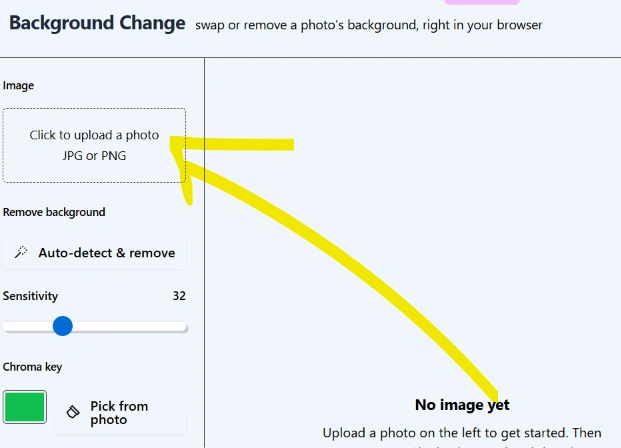
Open the background change tool and upload the photo you want to edit. Use a clear image whenever possible because a good-quality source image usually produces better results.
Step 2: Remove the Existing Background
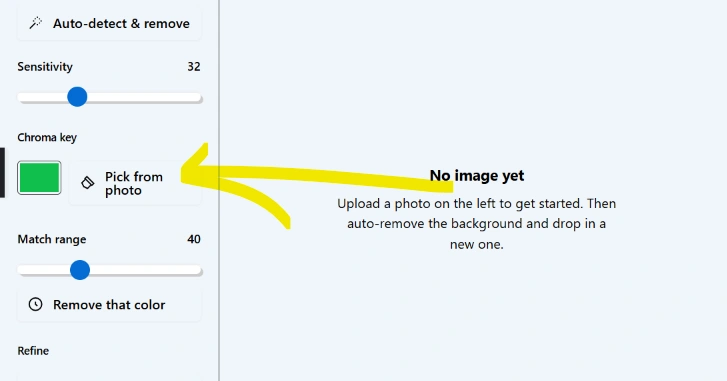
The tool processes the image and identifies the main subject. The unwanted background can then be removed.
Step 3: Choose a New Background
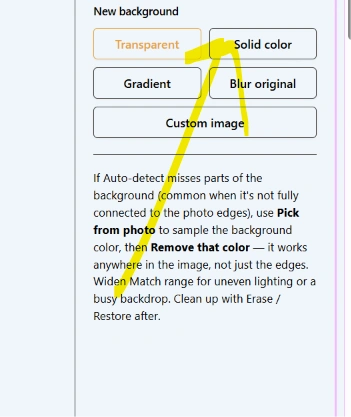
After removing the original background, select the background you want to use. You can choose a color, transparent background, or another suitable image if the tool supports these options.
Step 4: Preview the Result
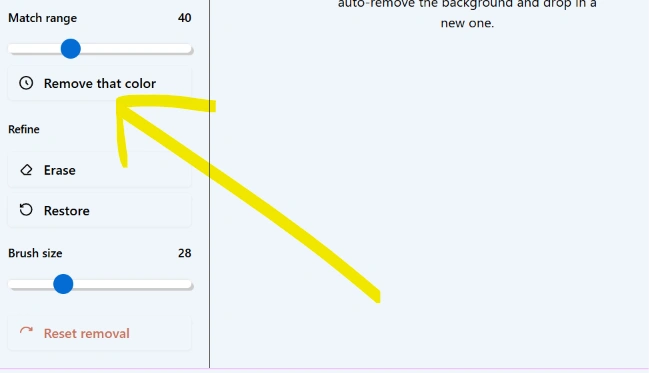
Check the edited image carefully. Look around the edges of the subject, especially around hair, clothing, and other detailed areas.
Step 5: Download Your Image
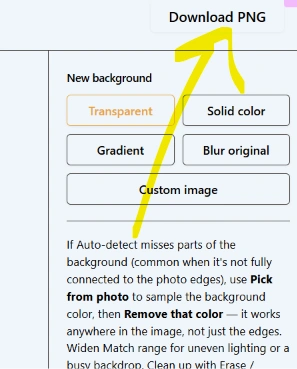
Once you are happy with the result, download the finished image in the available format.
Why Use an Online Background Change Tool?
Traditional image-editing applications can be powerful, but they may require installation, experience, and time. An online tool can be more convenient when you only need to make a quick edit.
Easy for Beginners
You don’t need to be a professional graphic designer to change a photo background. A simple interface can make the process accessible to beginners.
No Complicated Software
You can perform basic background editing directly through your browser instead of installing a large photo-editing application.
Useful for Different Types of Photos
Background editing can be useful for portraits, profile pictures, product photos, ID-style images, creative designs, and many other projects.
Saves Time
For simple edits, an online background change tool can be much faster than manually creating selections and masks in professional editing software.
Where Can Background Change Be Useful?
There are many situations where changing a photo background can be helpful.
Profile Pictures
A clean background can make a profile photograph look more professional. You can replace a distracting background with a simple color or another suitable design.
Product Photography
Online sellers often need clean product images. Removing a busy background can help the product stand out and create a consistent appearance across a catalog.
Social Media
Creative backgrounds can make photos more interesting for social media posts, thumbnails, and other digital content.
Resume and Professional Photos
A simple background may be preferable for professional photographs. Depending on the requirements of the organization, a plain background can provide a cleaner appearance.
School and College Projects
Students can use background editing for presentations, posters, assignments, and creative projects.
Personal Photography
You can also use background change simply to experiment with your photos and create different visual effects.
Tips for Getting Better Background Change Results
The quality of the final image depends partly on the original photograph. These tips can help:
Use a clear photo: High-quality images generally provide more detail for background detection.
Choose good lighting: Subjects with sufficient lighting are usually easier to distinguish from their surroundings.
Avoid extremely cluttered backgrounds: A complicated background can make separation more difficult.
Check the edges: Zoom in after processing and inspect hair, fingers, clothing, and other fine details.
Use a suitable replacement background: The new background should match the subject’s lighting and overall appearance.
Don’t over-edit: A simple and natural background often looks better than an overly complicated design.
Background Change vs. Background Removal
These two terms are closely related but are not exactly the same.
Background removal focuses on taking the original background out of an image. The result may have a transparent background.
Background change goes one step further by replacing the original background with a new one.
For example:
Original photo → Remove background → Add new background → Final image
This makes background change particularly useful when you want a complete visual transformation rather than simply making the background transparent.
Is Background Change Free?
If you are using our free background change tool, you can edit your images online without purchasing expensive photo-editing software. Availability of specific features, image limits, file formats, or processing options may depend on the tool.
Before downloading an image, always check the preview to make sure the result meets your requirements.
Privacy and Image Security
When using any online image-editing service, it is important to understand how uploaded files are handled.
For a trustworthy tool, users should be able to find clear information about image processing, storage, and deletion practices. Do not upload sensitive photographs or confidential documents unless you understand the website’s privacy practices.
For website owners, clearly explaining how user uploads are processed can also help build trust with visitors.
Frequently Asked Questions
What is background change?
Background change is the process of removing an existing photo background and replacing it with another background, such as a color, image, or transparent background.
Can I change a photo background online?
Yes. Online background-changing tools allow users to upload an image and edit its background through a web browser.
Do I need Photoshop to change a background?
No. For basic background editing, an online tool can be a simpler alternative to professional image-editing software.
Can I make the background transparent?
If the tool supports transparency, you can remove the original background and download the image with a transparent background.
Which photos work best?
Clear, well-lit photographs with a noticeable difference between the subject and background generally produce better results.
Can I use the edited image for social media?
Yes, provided that you have the necessary rights to the original photograph and any replacement background you use.
Final Thoughts
Changing a photo background doesn’t have to be a complicated editing task. With an easy-to-use background change tool, you can remove distracting backgrounds and create cleaner, more useful images directly from your browser.
Whether you’re editing a profile photo, improving a product image, preparing a presentation, or creating content for social media, background editing can give your images a completely different look.
Explore Our Tools
- Clipboard Online
- Text Art: Create Amazing Text Art Online With Emojis
- Protected Text – Securely Create and Share Text Online
- Text Repeater 10000 Times – Repeat Text Online Free
- Reduce Image Size in KB Online
- Text Art: Create Amazing Text Art Online With Emojis
- Increase Image Size to 100KB Online – Free Image Size Increasing Tool