Compress a photo down to an exact size.
Set the target in KB or MB — the tool searches for the highest quality that still fits, entirely in your browser. Nothing is uploaded anywhere.
Photo KB Reducer – Reduce Photo Size to KB Online Free
If you need to reduce the file size of an image without installing complicated software, a Photo KB Reducer can make the process quick and simple. Whether you need a photo under 20 KB, 50 KB, 100 KB, 200 KB, or another specific size, an online photo compression tool can help you prepare the image for websites, online applications, forms, exams, government portals, and other platforms.
A Photo KB Reducer is a web-based tool designed to reduce the file size of photos while keeping the image as clear as possible. Instead of manually changing image dimensions or using desktop editing software, users can upload a photo, select their required size, and download the compressed image.
What Is a Photo KB Reducer?
A Photo KB Reducer is an online web tool that reduces the storage size of an image from a larger file size to a smaller size measured in kilobytes (KB).
For example, suppose you have a photograph that is 1 MB in size, but an online application only accepts an image below 100 KB. A Photo KB Reducer can compress the image so that it is much smaller and suitable for uploading.
The tool can be useful for:
Reducing JPG photo size
Reducing JPEG image size
Compressing PNG images
Creating small photos for online forms
Reducing passport photo file size
Preparing images for government applications
Reducing images for examination forms
Making photos suitable for websites
Saving storage space
Sharing images more easily
The main purpose is simple: reduce photo file size while maintaining acceptable visual quality.
Why Do You Need a Photo KB Reducer?
Many websites place restrictions on the size of images that users can upload. An application portal may require a photograph to be below 50 KB, while another website may specify a maximum size of 100 KB or 200 KB.
A normal smartphone photograph can easily be several megabytes because modern cameras capture high-resolution images.
For example:
Original photo: 3.5 MB
Required maximum: 100 KB
Uploading the original image would not be possible if the website has a 100 KB limit.
Using a Photo KB Reducer, you can significantly reduce the image size and create a smaller file suitable for the upload requirement.
Photo KB Reducer Online – How It Works
Using an online Photo KB Reducer is generally straightforward.
Step 1: Select Your Photo
Open the Photo KB Reducer web tool and select the image from your device.
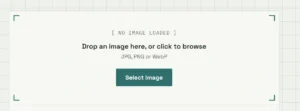
You can usually select an image from:
Computer
Laptop
Android phone
iPhone
Tablet
Step 2: Choose the Required KB Size
If the tool provides target-size options, select the size you need.
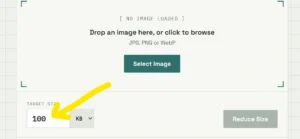
Common options include:
20 KB
30 KB
50 KB
100 KB
150 KB
200 KB
500 KB
1 MB
Step 3: Compress the Image
Click the Reduce KB, Compress Photo, or similar button.
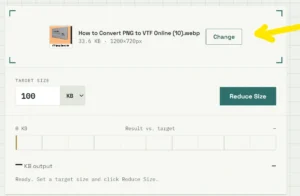
The tool processes the image and attempts to reduce its file size.
Step 4: Preview the Result
Check the compressed photo before downloading it.
Look at important details such as:
Face clarity
Text visibility
Image dimensions
Overall sharpness
File size
Step 5: Download the Reduced Photo
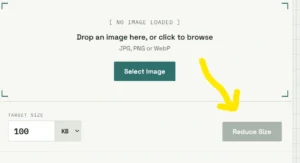
Once the image meets your requirements, download the smaller file and use it wherever necessary.
Photo KB Reducer for Online Forms
One of the most common uses of a Photo KB Reducer is preparing photographs for online application forms.
Many online forms specify image requirements such as:
Photograph should be between 20 KB and 50 KB.
If your photograph is 500 KB, 1 MB, or larger, it may be rejected by the website.
A Photo KB Reducer can help create a smaller version that meets the portal’s file-size requirement.
Before uploading the image, always check the application’s complete specifications. Some websites specify both file size and image dimensions.
For example, a form may require:
File format: JPG
Maximum size: 100 KB
Width: 200 pixels
Height: 230 pixels
Reducing only the KB size may not be enough if the dimensions are also restricted.
Reduce Photo to 20 KB
Sometimes an application specifically requires a photograph below or around 20 KB.
Reducing a large photograph to such a small size can require significant compression.
A Photo KB Reducer can help you create a smaller version of the image.
However, extremely small file sizes can reduce image quality. If the photograph becomes blurry or important details disappear, you may need to adjust the image dimensions or compression level.
For applications, always follow the exact instructions provided by the website.
Reduce Photo to 50 KB
A 50 KB image requirement is also common on online forms and document-upload systems.
If your original photograph is several hundred kilobytes or a few megabytes, you can use a Photo KB Reducer to create a smaller copy.
The best result depends on:
Original resolution
Image format
Image dimensions
Amount of detail
Compression level
A photograph with a simple background may compress more efficiently than a highly detailed photograph.
Reduce Photo to 100 KB
If a website accepts photographs up to 100 KB, reducing your image to approximately 100 KB can make uploading easier.
For example:
Original: 2.8 MB
Target: 100 KB
The Photo KB Reducer compresses the image and creates a significantly smaller file.
This can be particularly useful when filling out:
Job applications
College admission forms
Scholarship forms
Examination forms
Government applications
Registration forms
Photo KB Reducer vs Image Resizer
A Photo KB Reducer and an image resizer are related, but they are not exactly the same.
Photo KB Reducer
The primary purpose is to reduce the file size.
For example:
2 MB → 100 KB
Image Resizer
The primary purpose is to change the dimensions of an image.
For example:
4000 × 3000 pixels → 800 × 600 pixels
Reducing dimensions can also reduce file size, but the two operations have different purposes.
For some applications, you may need both. First resize the image to the required dimensions and then compress it to the required KB size.
Photo KB Reducer for JPG and JPEG Images
JPG and JPEG are popular image formats because they generally provide good image quality with relatively small file sizes.
A Photo KB Reducer can compress JPG and JPEG photographs by adjusting image compression and, when necessary, dimensions.
This makes the format particularly useful for:
Passport photographs
Profile pictures
Application forms
Website images
Online documents
If your original photo is already heavily compressed, reducing it further may noticeably affect quality.
Can a Photo KB Reducer Reduce PNG Images?
Yes, many image compression tools can process PNG files.
However, PNG and JPG use different compression approaches.
PNG is commonly useful for:
Graphics
Screenshots
Logos
Images containing text
Transparent images
JPG is commonly preferred for photographs.
If the goal is to make a photograph extremely small, converting a suitable image from PNG to JPG may sometimes produce a much smaller file. However, conversion can change image quality and transparency.
How Does Photo Compression Reduce File Size?
There are several techniques that can be used to reduce image file size.
1. Compression
Image compression removes or simplifies information that is less important to the visual appearance of the image.
2. Resizing
Reducing the width and height of an image can significantly reduce the amount of image data.
For example:
4000 × 3000 → 1200 × 900
The smaller image generally requires less storage.
3. Image Quality Adjustment
For JPEG images, reducing the quality setting can decrease the file size.
The challenge is finding the right balance between:
File Size ↔ Image Quality
A good Photo KB Reducer attempts to produce a useful image without unnecessary quality loss.
Benefits of Using a Photo KB Reducer
There are several advantages to using an online Photo KB Reducer.
Free and Easy to Use
A web-based tool can eliminate the need to install desktop software.
Saves Time
Instead of manually opening an image editor and changing multiple settings, users can use a dedicated tool.
Useful for Online Applications
The tool can help prepare images according to upload-size requirements.
Works on Different Devices
A browser-based tool can potentially be used on:
Windows
macOS
Android
iPhone
Linux
Reduces Storage Requirements
Smaller images take less storage space.
Faster Uploading
A smaller image can generally be uploaded more quickly than a large original file, especially on slower connections.
Photo KB Reducer for Government Forms
Many government and public-service websites require users to upload photographs and documents with specific file-size limits.
If your photograph is too large, the website may display an error such as:
“File size exceeds the maximum limit.”
Instead of repeatedly trying to upload the original photograph, you can use a Photo KB Reducer to create a smaller version.
Always read the official application instructions carefully because the required KB range, dimensions, file format, and other requirements can vary.
Photo KB Reducer for Students
Students frequently upload photographs for:
Entrance examinations
College admissions
Scholarships
University registrations
Examination forms
Identity cards
Online applications
A Photo KB Reducer can make the preparation process easier when the portal has a strict image-size limit.
For example, if an examination portal accepts only a 50 KB photograph, you can reduce your image before uploading it.
Photo KB Reducer for Job Applications
Job portals and recruitment websites sometimes request photographs or profile images with specific size limits.
A large smartphone photograph may not meet these requirements.
Using a Photo KB Reducer allows you to create a smaller copy without changing the original photo.
It is always recommended to keep your original high-quality photograph separately and use the compressed version only for websites that require it.
Does Reducing KB Reduce Image Quality?
It can.
The amount of quality loss depends on how aggressively the image is compressed.
For example:
1 MB → 700 KB
may have little noticeable difference.
But:
1 MB → 20 KB
may require much stronger compression and could result in visible quality loss.
A good Photo KB Reducer should try to balance file size and image quality.
For very small target sizes, some loss of quality may be unavoidable.
Tips for Getting Better Results
Follow these tips when reducing a photo.
Use the Correct Original Image
Start with a clear, properly exposed photograph.
Crop Unnecessary Areas
Removing unnecessary background can reduce dimensions and sometimes reduce file size.
Resize When Appropriate
If the original photograph is extremely large, reducing its dimensions before compression can provide better results.
Choose the Correct Format
JPG is often a practical choice for photographs.
Don’t Overcompress
If the resulting image is too blurry, use a slightly larger file size if the website allows it.
Check the Final File Size
Always verify the downloaded image’s actual size before uploading it.
Is a Photo KB Reducer Safe?
The safety of an online image tool depends on how the particular website processes uploaded files.
When using an online image compressor, consider whether:
Images are processed locally in your browser.
Images are uploaded to a server.
Uploaded files are automatically deleted.
The website has a clear privacy policy.
HTTPS is used.
The website explains how uploaded files are handled.
For sensitive photographs or documents, a browser-based tool that processes images locally can offer an additional privacy advantage because the original file does not need to be uploaded to a remote server.
Why Use Our Photo KB Reducer?
Our Photo KB Reducer is designed to make image-size reduction simple for everyday users.
Instead of dealing with complicated image-editing software, users can use the web tool directly from their browser.
The goal is to provide a straightforward experience:
Upload → Select Size → Reduce → Preview → Download
The tool can be useful when you need to prepare an image for an online form, application, website, examination portal, or other service with a file-size restriction.
Frequently Asked Questions
What is a Photo KB Reducer?
A Photo KB Reducer is a web tool that reduces the file size of a photograph, usually measured in KB or MB, so that the image can meet a website’s upload requirements.
Can I reduce a photo to 20 KB?
Yes, if the image and compression settings allow it. However, reducing a large photograph to 20 KB can cause noticeable quality loss.
Can I reduce a photo to 50 KB?
Yes. A Photo KB Reducer can be used to create a smaller image around a 50 KB target, depending on the original image.
Can I reduce a photo to 100 KB?
Yes. 100 KB is a common target for online applications and forms.
Does reducing KB change image dimensions?
Not necessarily. Some tools only compress the image, while others may also resize its dimensions to achieve a smaller file size.
Does Photo KB Reducer work on mobile phones?
A browser-based tool can generally be accessed from smartphones as long as the browser and website support the required image-processing features.
Should I delete my original photo after compression?
No. Keep the original high-quality photograph and use the reduced copy when a website requires a smaller file.
Conclusion
A Photo KB Reducer is a useful online solution for anyone who needs to reduce the file size of a photograph. From examination forms and college applications to government websites and job applications, many platforms have strict image-size requirements.
Instead of installing complicated software, users can use a web-based Photo KB Reducer to compress their photos and prepare smaller files.
Whether you need to reduce a photograph to 20 KB, 50 KB, 100 KB, 200 KB, or another target size, the key is to balance the required file size with acceptable image quality.
Upload your photo, choose the required size, reduce the KB, check the result, and download your optimized image.