Image Size Reducer
Compress an image down to a target file size, right in your browser.
Click to choose an image or drag one here
JPEG, PNG, or WebP
PNG has no quality control, so choosing JPEG/WebP lets the tool actually hit a target — the original is auto re-encoded.
Reduce Image Size in KB Online – Free Image Compressor Tool
If you need to reduce image size in KB, you don’t always need complicated photo-editing software. An online image compression tool can quickly reduce the file size of JPG, JPEG, PNG, and other supported image formats while keeping the image suitable for websites, forms, applications, and social media.
Whether you need to upload a photo under 20KB, 50KB, 100KB, 200KB, 500KB, or 1MB, a browser-based image compressor can make the process simple and convenient.
What Does “Reduce Image Size in KB” Mean?
The term reduce image size in KB means decreasing the storage size of an image file without unnecessarily reducing its visual quality.
For example:
- Original image: 2.5 MB
- Compressed image: 350 KB
- Further optimized image: 100 KB
The image dimensions can sometimes remain the same while compression reduces the amount of data stored in the file.
This is particularly useful when a website, online application, government form, examination portal, or job application specifies a maximum image size.
Reduce Image Size in KB Online
Our online image compression tool is designed to help users reduce image size in KB directly from their browser.
You can upload an image, choose an appropriate compression level or target size, and download the optimized image without installing additional software.
Why Use an Online Image Compressor?
An online tool can be useful when you need to:
- Reduce image size in KB quickly
- Compress JPG and JPEG images
- Compress PNG images
- Prepare photos for online forms
- Reduce images for websites
- Optimize images for email
- Reduce storage requirements
- Make images easier to share
- Prepare passport-size photos for applications
- Upload images with strict file-size limits
How to Reduce Image Size in KB
Reducing an image file size is usually a simple process.
Step 1: Upload Your Image
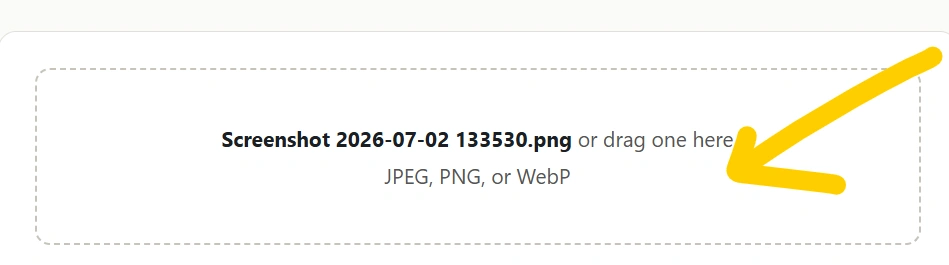
Open the image compression tool and select the JPG, JPEG, PNG, or another supported image from your device.
Step 2: Select the Desired Size
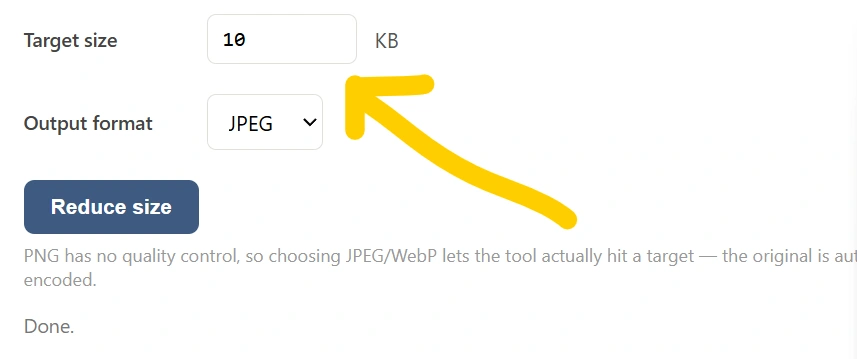
If the tool supports target-size compression, select the size you need, such as:
- 20 KB
- 50 KB
- 100 KB
- 200 KB
- 500 KB
- 1 MB
The exact final size can depend on the original image, dimensions, format, and image content.
Step 3: Compress the Image
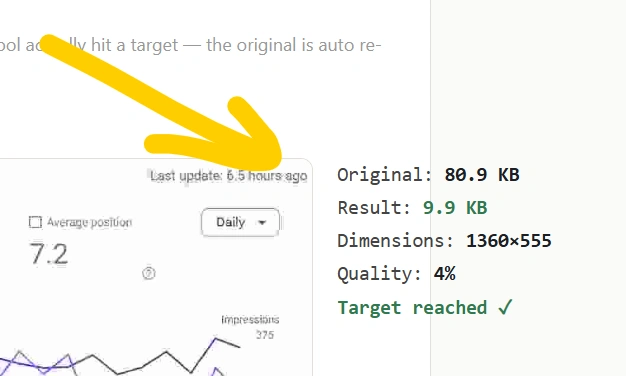
Click the Compress, Reduce Size, or similar button. The tool processes the image and reduces unnecessary file data.
Step 4: Download the Compressed Image
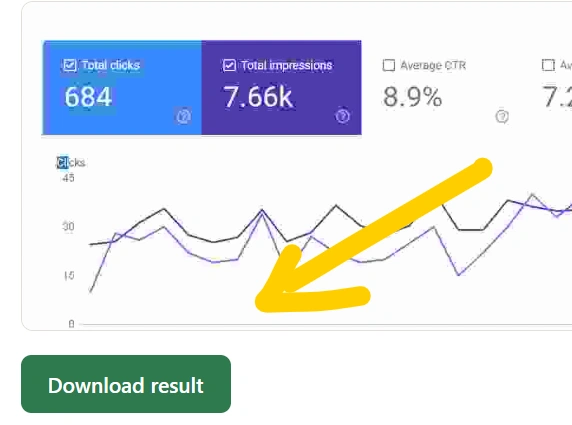
After compression is complete, download the smaller image and use it for your application, website, document, or other purpose.
Reduce Image Size in KB Without Losing Too Much Quality
Image compression always involves a balance between file size and image quality.
If you compress an image too aggressively, you may notice:
- Blurry details
- Pixelation
- Visible compression artifacts
- Loss of sharpness
- Reduced text readability
For most everyday purposes, moderate compression provides a good balance between quality and file size.
For example, a large photograph may be reduced significantly while still looking almost identical at normal viewing sizes.
Why Is It Important to Reduce Image Size?
Large images can create several problems.
1. Faster Website Loading
Large image files require more data to download. Compressing images can help reduce page weight and improve loading performance.
2. Easier File Uploads
Many websites limit the maximum file size that users can upload. A compressed image is more likely to meet those requirements.
3. Saves Storage Space
Reducing image sizes can help save storage space when you have hundreds or thousands of photos.
4. Easier Sharing
Smaller images are generally easier to send through email and messaging services.
5. Better Web Performance
Websites containing many high-resolution images can become unnecessarily heavy. Properly optimized images can contribute to a more efficient website.
Reduce Image Size in KB for Online Forms
One of the most common reasons people search for reduce image size in KB is to upload photographs and documents to online forms.
Government applications, educational forms, recruitment websites, scholarship applications, entrance examinations, and other portals may specify requirements such as:
Upload an image between 20 KB and 100 KB.
If your photograph is several hundred kilobytes or a few megabytes, you may need to compress it before uploading.
Instead of opening advanced editing software, an online image compressor can provide a quicker solution.
Reduce Image Size in KB for Government Forms
Many online application forms specify strict image requirements. Before uploading your image, check the application’s official instructions carefully.
For example, an application may specify:
- Maximum file size
- Minimum file size
- Required dimensions
- JPG/JPEG format
- Specific photograph dimensions
- Specific signature dimensions
Simply reducing the file size may not be enough if the website also requires specific dimensions or a particular format.
Reduce Image Size in KB for Website Use
Website owners often need to optimize images before publishing them.
Uploading a 3 MB photograph when a much smaller file would provide the same visual result can unnecessarily increase the page’s download size.
A useful image optimization workflow is:
Resize → Compress → Check Quality → Upload
For photographs, JPEG or modern formats can often provide much smaller files than an uncompressed image.
For graphics containing transparency, PNG may be more appropriate, although the resulting file can sometimes be larger.
JPG vs PNG: Which Is Better for Smaller File Size?
The best format depends on the image.
JPG/JPEG
JPG is commonly suitable for:
- Photographs
- Portraits
- Landscapes
- Camera images
- Real-world scenes
JPEG compression can produce significantly smaller files while maintaining acceptable visual quality.
PNG
PNG is often useful for:
- Logos
- Icons
- Screenshots
- Graphics
- Images requiring transparency
However, PNG files can sometimes be considerably larger than JPEG files for photographic content.
Therefore, if your main objective is to reduce image size in KB, choosing the appropriate format can make a significant difference.
Can You Reduce an Image to Exactly 20 KB?
It is possible for an image-compression tool to target a particular file size, but achieving an exact size while preserving acceptable quality can be technically challenging.
For example, reducing a photograph to approximately 20 KB may require:
- Resizing the image
- Adjusting compression quality
- Testing the resulting file
- Repeating the process until the desired range is reached
Highly detailed photographs generally require more data than simple images.
Reduce Image Size in KB on Mobile
You don’t necessarily need a computer to compress an image.
A browser-based image compressor can be used from many smartphones and tablets. The basic process is:
Open tool → Select photo → Choose target size → Compress → Download
This can be particularly useful when completing online applications directly from a mobile device.
Is It Safe to Compress Images Online?
Privacy should always be considered when uploading files to online services.
If an image contains sensitive information, such as identity documents, personal certificates, financial information, or private photographs, check the website’s privacy practices before uploading it.
A browser-based compression tool that processes images locally on the device can provide an additional privacy advantage because the original image does not necessarily need to be uploaded to a server.
Tips to Reduce Image Size in KB
Here are some practical tips for getting a smaller image without unnecessarily damaging quality:
Use the Correct Dimensions
If you only need a 600 × 600 pixel image, there may be little reason to upload a 4000 × 4000 pixel photograph.
Choose the Appropriate Format
Use JPEG for many photographs and PNG when transparency or lossless graphics are important.
Don’t Overcompress
Extremely aggressive compression can make an image look poor.
Remove Unnecessary Metadata
Some image files contain metadata that isn’t required for everyday use. Removing unnecessary metadata can sometimes reduce the file size.
Preview Before Downloading
Always check the compressed image before using it for an important application.
Frequently Asked Questions
What is the easiest way to reduce image size in KB?
The easiest method is to use an online image compression tool. Upload the image, choose your desired compression or target size, and download the compressed file.
How can I reduce a photo from MB to KB?
You can reduce a photo from MB to KB by compressing it, resizing its dimensions, changing its format when appropriate, or combining these techniques.
Can I reduce an image to 100 KB?
Yes. An image compressor with target-size functionality can attempt to reduce an image to approximately 100 KB.
Can I reduce an image to 20 KB?
Yes, but very small target sizes can require significant compression and/or resizing, especially for detailed photographs.
Does reducing KB reduce image quality?
It can. Generally, the greater the compression, the greater the potential quality loss. A good compressor attempts to find a balance between file size and visual quality.
Can I reduce image size without changing dimensions?
Yes. Compression can reduce file size without changing the image’s pixel dimensions. However, resizing can provide additional size reduction when appropriate.
Is JPG smaller than PNG?
For many photographs, JPG is usually smaller than PNG. However, the result depends on the image and compression settings.
Conclusion
If you frequently need to reduce image size in KB, an online image compressor can save time and eliminate the need for complicated editing software. It can be useful for online forms, government applications, websites, email attachments, document uploads, and everyday image sharing.
For the best results, choose an appropriate target size, maintain reasonable image quality, and check the requirements of the website where you intend to upload the image.
Need to reduce an image to a specific size such as 20KB, 50KB, 100KB, 200KB, or 500KB? Use the online image compression tool to quickly optimize your image directly from your browser.