Increase Image Size to 100KB Online – Free Image Size Increasing Tool
If you need to increase image size to 100KB for an online application, form, examination, government website, passport application, job application, or document submission, finding the right tool can save a lot of time. Many websites require an image to meet a specific file-size limit, such as 100KB, and simply increasing the image dimensions does not always increase the actual file size.
Our Increase Image Size to 100KB web tool is designed to make this process simple. You can upload an image, adjust its file size, and create an image that is close to 100KB without installing additional software.
Increase Image Size to 100KB Online
The Increase Image Size to 100KB tool allows users to increase the file size of an image directly from a web browser. It can be useful when a website requires an image to be at least a particular size before accepting the upload.
Unlike normal image resizing tools, which primarily change image dimensions, an image-size increasing tool focuses on the file size in KB.
For example, if your original image is only 45KB but an application requires an image around 100KB, you may need to increase its file size before uploading it.
How to Increase Image Size to 100KB
Using the Increase Image Size to 100KB tool is straightforward:
Open the image size increasing tool.
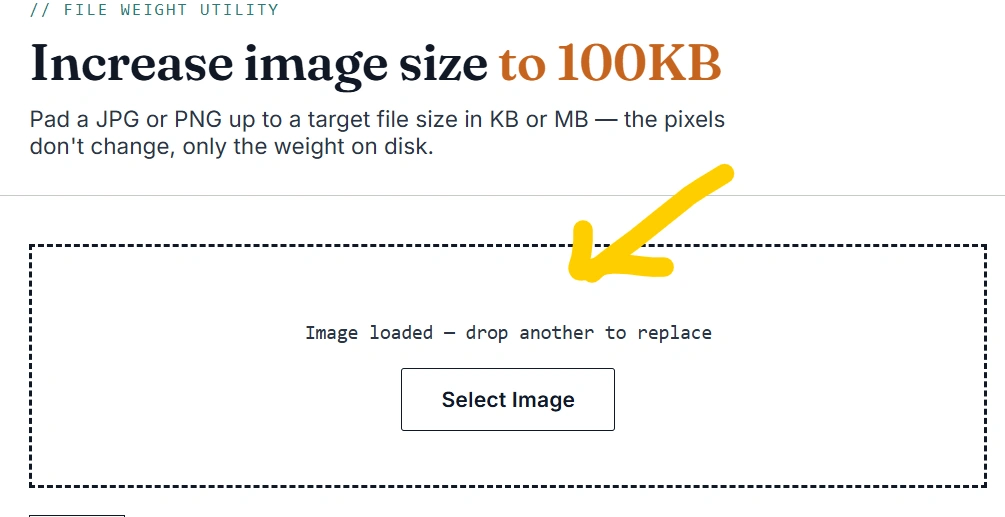
2. Upload your JPG, JPEG, PNG, or supported image.
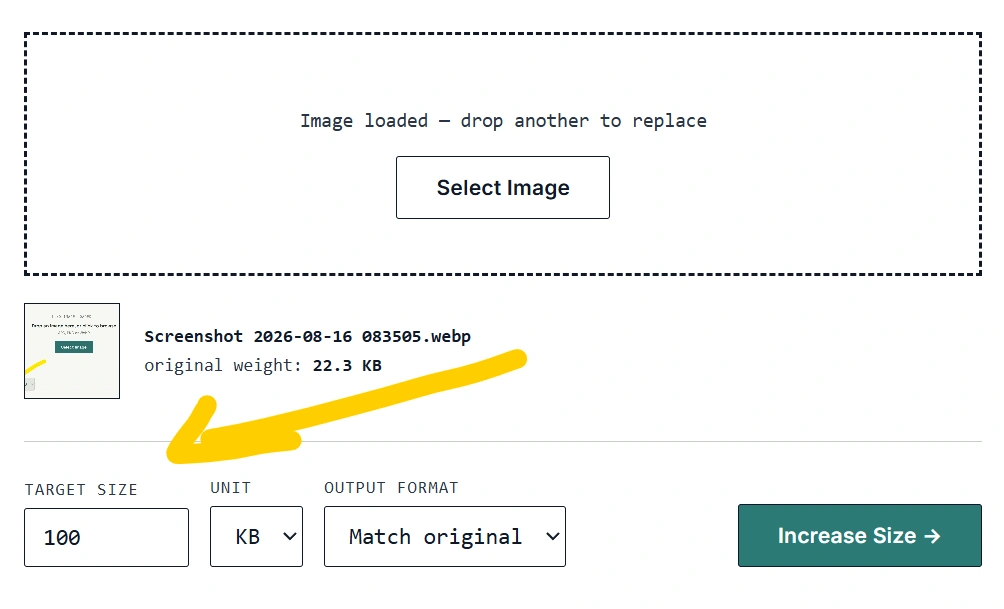
3. Select or enter 100KB as the target size.
4. Start the processing.

5. Preview the resulting image.
6. Download the processed image.
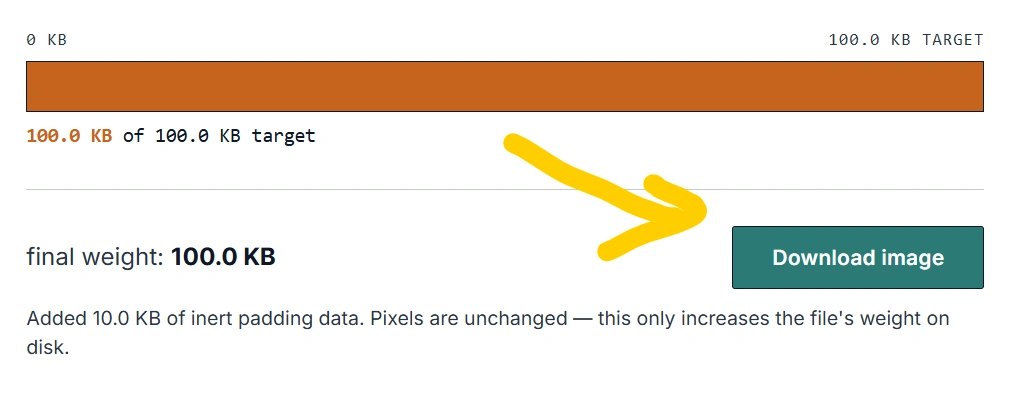
7. Check the final file size before uploading it to another website.
The entire process can be completed online without installing image-editing software.
Why Do You Need to Increase an Image to 100KB?
There are several situations where users may need to increase image size to 100KB.
Some online forms specify minimum and maximum file-size requirements. For example, a form might say that an image should be between 50KB and 100KB. If your image is only 30KB, it may be rejected even though the image looks perfectly clear.
Common situations include:
Government application forms
Scholarship applications
College admission forms
Job applications
Competitive examination forms
Passport and visa applications
ID-card applications
Resume and profile forms
Online registration portals
Document-upload websites
Photography and printing requirements
In these situations, increasing the file size can help make the image compatible with the upload requirements.
What Does 100KB Mean for an Image?
KB stands for kilobyte, a unit used to describe digital file size. When a website says that an image must be approximately 100KB, it is referring to the size of the image file rather than its physical dimensions.
For example:
Image A: 35KB
Image B: 67KB
Image C: 99KB
Image D: 100KB
Image E: 150KB
These images can potentially have completely different dimensions and visual qualities.
Therefore, image dimensions and image file size are not the same thing.
A 100KB image could be 500 × 500 pixels, 800 × 600 pixels, or another resolution depending on its format and compression.
Increase Image Size Without Losing Too Much Quality
When you increase image size to 100KB, the goal should not simply be to make the file larger. Maintaining reasonable image quality is also important.
An image can be made larger by changing factors such as:
Image dimensions
Image format
Compression level
Image metadata
Encoding settings
Image quality settings
However, increasing the dimensions unnecessarily can make an image blurry when it is enlarged.
A better approach is to process the image according to the requirements of the website where you intend to upload it.
Can You Increase a 20KB Image to 100KB?
Yes. If your original image is 20KB, it may be possible to create a version closer to 100KB.
However, the exact method depends on the image format and its content. A simple photograph, screenshot, logo, or graphic may respond differently to changes in encoding and quality.
For example, increasing the JPEG quality can generally produce a larger file, while converting between formats can also change the resulting file size.
The Increase Image Size to 100KB tool can automate this process so users don’t have to manually experiment with different settings.
Increase JPG Image Size to 100KB
JPG and JPEG images are widely used for photographs and online applications.
If you have a JPG image that is smaller than the required size, you can use an Increase Image Size to 100KB tool to create a larger file.
This can be useful for:
Passport photographs
Profile photographs
Job application photos
College forms
Examination forms
Government applications
Online registration forms
Before submitting the image, always check the specific website’s requirements because some websites specify both minimum and maximum file sizes.
Increase PNG Image Size to 100KB
PNG files are commonly used for screenshots, graphics, logos, icons, and images requiring transparency.
If your PNG file is below the required size, an image-size increasing tool can help produce a larger file.
However, PNG and JPG use different compression methods. As a result, a PNG image and a JPG image containing the same visual content can have very different file sizes.
If the website accepts JPG or JPEG, converting a PNG to JPG may sometimes be useful, but you should always follow the upload requirements of the destination website.
Increase Image Size to Exactly 100KB
Many people search for increase image size to exactly 100KB because an application specifies a particular file size.
It is important to understand that “100KB” can sometimes be interpreted differently by different software or websites. Some systems use decimal units while others use binary units.
For this reason, a tool may target a file size very close to 100KB rather than guaranteeing an identical byte count in every situation.
If a website specifies a range such as 50KB–100KB, staying safely within that range is usually more important than targeting an exact byte count.
Is Increasing Image Size the Same as Increasing Image Resolution?
No.
This is one of the most important things to understand.
File size is measured in KB or MB, while image resolution is commonly represented by dimensions such as 600 × 600 pixels.
Increasing resolution changes the number of pixels in the image. Increasing file size changes how much digital storage the image occupies.
For example, an image could have:
600 × 600 pixels and 40KB
while another image could have:
600 × 600 pixels and 100KB
The dimensions can remain exactly the same while the file size changes because of different compression or encoding settings.
Benefits of an Increase Image Size to 100KB Tool
A dedicated tool provides several advantages:
1. Simple Interface
You don’t need advanced image-editing knowledge. Upload the image, select the target size, and process it.
2. No Complex Software
You can perform the task directly through your browser.
3. Useful for Online Forms
The tool can help when an application requires a specific image-size range.
4. Quick Processing
Instead of manually adjusting image settings multiple times, the tool can automate the process.
5. Convenient on Mobile
A browser-based tool can be used on smartphones as well as desktop computers.
6. Targeted File Size
The tool is specifically designed around the requirement to increase image size to 100KB.
Frequently Asked Questions
What is the Increase Image Size to 100KB tool?
The Increase Image Size to 100KB tool is an online utility designed to help users increase the file size of an image toward approximately 100KB.
Can I increase a 50KB image to 100KB?
Yes. An image that is below 100KB can potentially be processed to create a larger file closer to the 100KB target.
Can I increase a 20KB image to 100KB?
Yes. The tool can attempt to increase the file size of a smaller image toward 100KB.
Can I increase JPG size to 100KB?
Yes. JPG/JPEG images can be processed to target a file size around 100KB.
Can I increase PNG size to 100KB?
Yes, depending on the image and the processing method supported by the tool.
Will increasing the file size improve image quality?
Not necessarily. Increasing the file size does not automatically improve the original image’s visual quality. The purpose is primarily to meet a file-size requirement.
Does the tool change image dimensions?
That depends on the tool’s implementation. A good image-size tool should avoid unnecessary changes to dimensions when the user’s main requirement is file size.
Can I use the tool on my phone?
Yes, if the tool is browser-based and supports mobile devices.
Is 100KB the same as 100 pixels?
No. 100KB refers to file size, while pixels refer to image dimensions or resolution.
Tips Before Uploading Your 100KB Image
Before submitting your processed image to an online form, check the website’s requirements carefully.
Pay attention to:
Minimum file size
Maximum file size
Accepted image formats
Required dimensions
Maximum resolution
Required aspect ratio
Whether JPG, JPEG, or PNG is accepted
For example, if a website says 50KB to 100KB, creating a 150KB image will not satisfy the requirement even though it is larger than 100KB.
Conclusion
The Increase Image Size to 100KB tool provides a convenient solution when an online application requires an image to meet a particular file-size requirement. Instead of installing complicated image-editing software, users can upload their image, select a target around 100KB, process it, and download the resulting file.
Whether you need to increase JPG size to 100KB, increase PNG size to 100KB, or make a small image suitable for an online application, a dedicated browser-based tool can make the process faster and easier.
Try the Increase Image Size to 100KB tool today and prepare your image for websites and online forms in just a few steps.