Fake Call Generator
Have you ever needed a quick excuse to leave an uncomfortable conversation, meeting, or social situation? A fake call can provide a simple way to simulate an incoming phone call without actually contacting another person.
A Fake Call Generator is an online tool that creates a simulated phone-call experience on your screen. Depending on the tool, you can customize details such as the caller’s name, phone number, profile image, call duration, and incoming-call interface.
Unlike a real phone call, a simulated fake call does not actually connect to a mobile network or call the person displayed on the screen. It is designed primarily for entertainment, demonstrations, testing, videos, screenshots, and harmless pranks.


What Is a Fake Call?
A fake call is a simulated phone call that looks similar to an actual incoming call but does not originate from a real caller.
A fake incoming-call screen can display information such as:
- Caller name
- Phone number
- Profile picture
- Incoming call notification
- Accept button
- Decline button
- Call timer
- Ringtone
- Phone-call interface
A fake call generator makes it easier to create this simulation without manually designing a phone screen.
For example, you could enter a caller name such as “Mom,” “Friend,” “Office,” or another custom name and schedule a simulated incoming call. When the selected time arrives, the tool can display the fake incoming-call interface.
What Is a Fake Call Generator?
A Fake Call Generator is an online application designed to simulate an incoming phone call.
Instead of making a genuine telephone call, the tool creates a visual simulation on your device. This makes it useful when you want to demonstrate a phone-call interface or create a realistic-looking scene for a video or presentation.
A typical fake call generator may allow you to customize:
1. Caller Name
Enter the name you want to appear on the simulated call screen.
2. Phone Number
Add a custom phone number or other caller information.
3. Profile Picture
Some tools allow you to upload a profile image to make the simulated caller look more realistic.
4. Call Timing
Choose when the fake incoming call should appear.
5. Call Duration
Some simulators can display a call timer after the simulated call is accepted.
6. Call Interface
The interface can resemble a conventional smartphone incoming-call screen with options such as Accept, Decline, Mute, Speaker, Keypad, and Contacts.
How to Use a Fake Call Generator
Using a fake call generator can be very simple.
Step 1: Open the Fake Call Generator
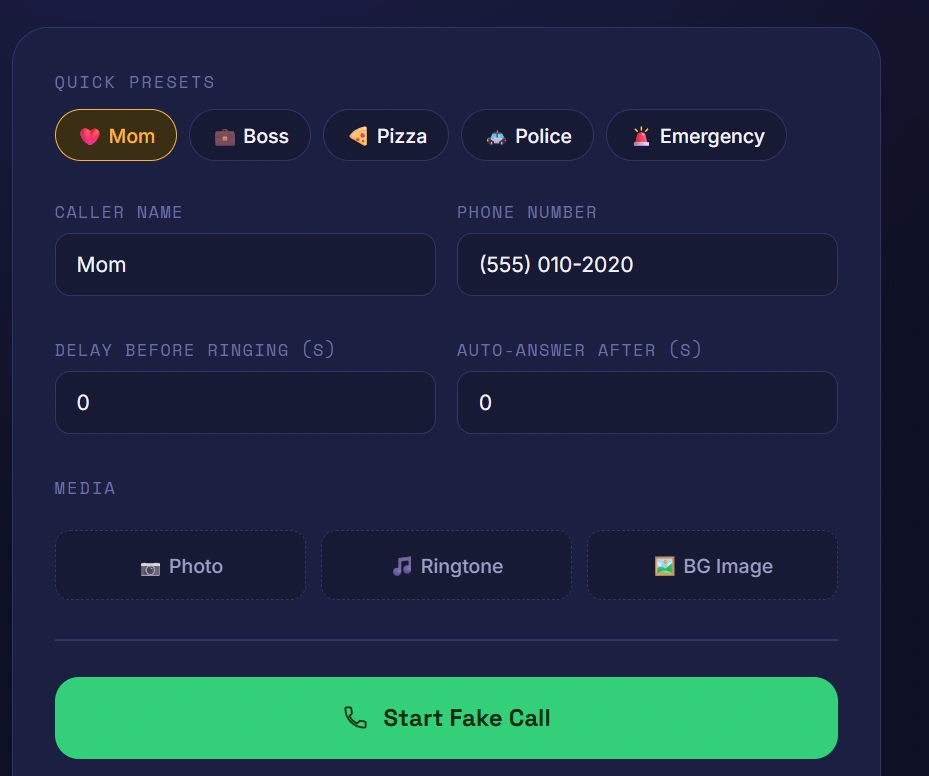
Open the online tool in your browser using a smartphone, tablet, or computer.
Step 2: Enter the Caller Name
Type the name you want to display on the simulated incoming-call screen.
For example:
Caller Name: Prateek
Step 3: Add a Number
Enter a number that you want the interface to display.
Step 4: Add a Profile Picture
If the tool supports images, upload a suitable profile picture.
Step 5: Select the Call Time
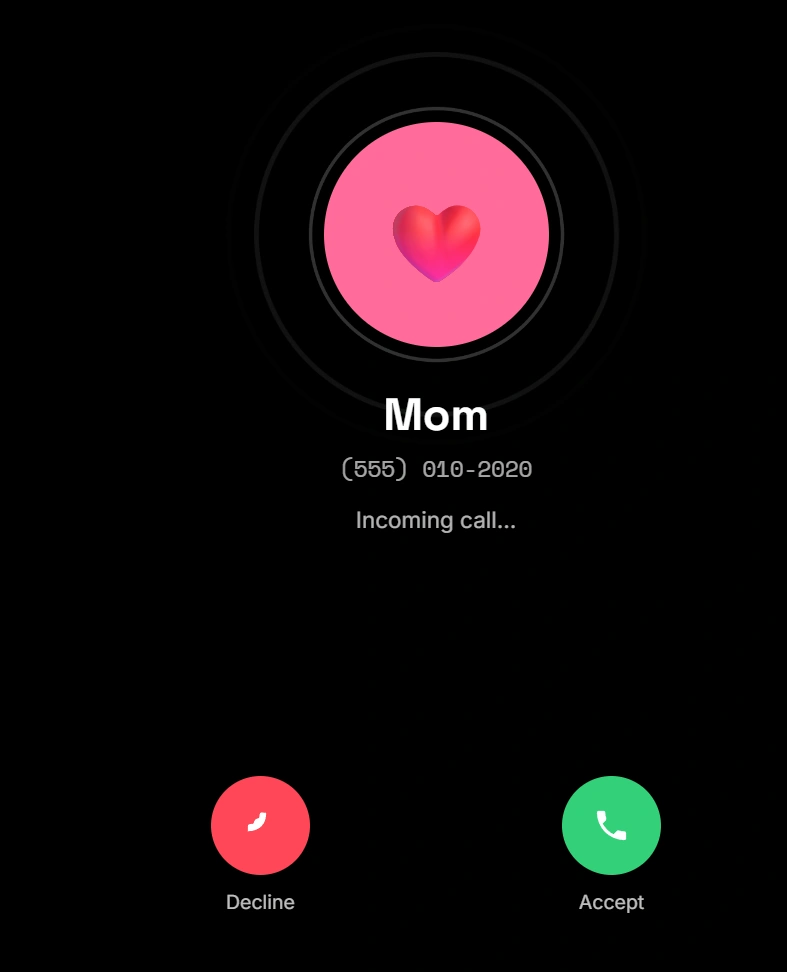
Choose whether the fake call should appear immediately or after a selected delay.
Step 6: Start the Simulation
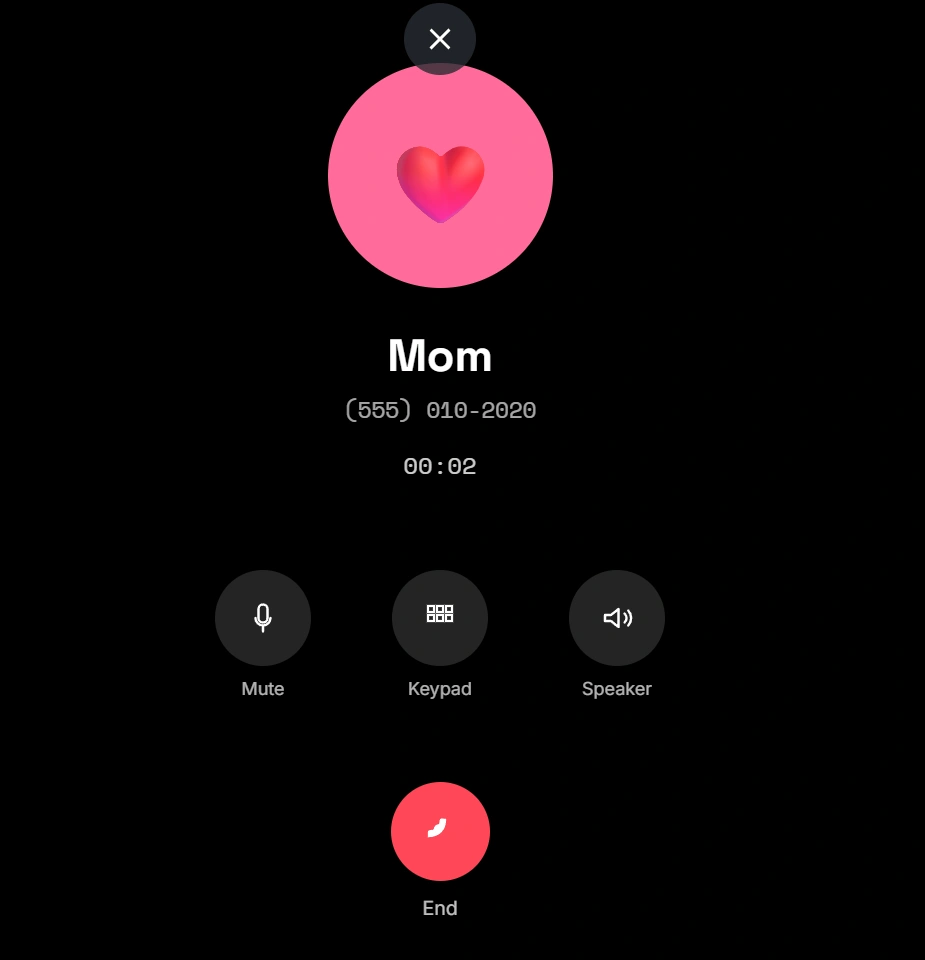
Click the Generate Fake Call, Start Call, or similar button.
The simulated incoming-call interface will then appear.
Why Use a Fake Call?
There are several legitimate reasons people use a fake call.
1. Entertainment
A simulated call can be used for harmless entertainment between friends.
2. Videos and Content Creation
Content creators may need an incoming-call screen for a video without using a real phone call.
3. Demonstrations
Teachers, developers, and designers can use a simulated call to demonstrate how a mobile interface works.
4. UI Testing
Developers can use simulated call screens while testing designs for mobile applications.
5. Photography and Screenshots
A fake incoming call can be useful when creating screenshots or visual demonstrations.
6. Practicing a Presentation
A simulated call can also be used as part of a role-play or demonstration.
Fake Call vs Real Phone Call
It is important to understand the difference between a fake call and a real telephone call.
| Feature | Fake Call | Real Call |
|---|---|---|
| Uses mobile network | No | Yes |
| Contacts another person | No | Yes |
| Shows caller interface | Yes | Yes |
| Can be customized | Usually | Limited |
| Requires another caller | No | Usually |
| Useful for demonstrations | Yes | Sometimes |
| Designed for simulation | Yes | No |
A fake call is therefore best understood as a simulation, rather than an actual telephone call.
Fake Incoming Call for Pranks
One of the most common uses of a fake incoming call is harmless pranking.
For example, you might create a simulated call from a fictional contact and use it as part of a joke with your friends.
However, responsible use is important. A fake call should not be used to impersonate someone, deceive people for financial gain, threaten someone, or create false evidence.
The best use of a fake call generator is simple entertainment and creative content.
Fake Call for Video Creators
Video creators frequently need realistic-looking phone interfaces.
Instead of recording a real phone call, creators can use a fake call generator to create a simulated call sequence.
For example, a video could show:
Incoming Call
Prateek
707070000
Then the simulated call could transition to:
00:23
This can make a video scene feel more realistic without requiring an actual phone conversation.
Fake Call Generator on Mobile
A browser-based fake call generator can be especially useful on mobile devices.
Modern web tools can be designed to work directly in mobile browsers without requiring users to install an application.
A good mobile-friendly fake call tool should have:
- Large buttons
- Simple controls
- Responsive design
- Fast loading
- Clear caller information
- Easy customization
- Touch-friendly interface
- No unnecessary registration
This makes it convenient for users who want to create a fake call quickly.
Is a Fake Call Real?
No. A fake call generated by a simulator is not a real telephone call.
It normally works by displaying a simulated incoming-call interface on your device. Depending on the implementation, the tool may use browser notifications, timers, fullscreen interfaces, sounds, or other visual effects.
The person shown as the caller does not actually receive a phone call.
This distinction is important because a fake call generator should be used as a simulation rather than as a way to impersonate a real person.
Features of a Good Fake Call Generator
If you are looking for a useful fake call generator, consider the following features.
Easy-to-Use Interface
Users should be able to create a simulated call without complicated settings.
Custom Caller Name
The ability to choose a caller name makes the simulation more flexible.
Custom Phone Number
A customizable number can make demonstrations more realistic.
Profile Image
A caller photo can improve the appearance of the simulated interface.
Call Timer
A timer can make the simulated call look more convincing for videos and demonstrations.
Mobile Support
The tool should work properly on Android, iPhone, tablets, and desktop browsers where supported.
Privacy
A browser-based tool should avoid unnecessarily collecting personal information.
Is Fake Call Generator Free?
Many browser-based fake call generators can be offered for free.
A free tool is particularly convenient because users can create a simulated call without purchasing an application or installing additional software.
If you’re building your own fake-call website, keeping the basic simulator free can also make the tool accessible to a larger audience.
Fake Call Generator for Content Creators
Content creators can use fake-call simulations in many different types of content.
For example:
- YouTube videos
- Short videos
- Tutorials
- UI demonstrations
- Educational presentations
- Mock interviews
- Comedy sketches
- Smartphone tutorials
- App demonstrations
A realistic-looking call interface can help communicate a story without requiring an actual incoming call.
Privacy and Safe Use
When using any fake call website, avoid entering unnecessary sensitive information.
A good online tool should not require private information simply to generate a simulated call.
Also remember that creating a fake call is different from creating fake evidence. Do not use simulated call screens to falsely claim that a real person contacted you or to mislead someone in a harmful way.
Use the technology responsibly for entertainment, testing, demonstrations, and creative projects.
Frequently Asked Questions About Fake Call
What is a fake call?
A fake call is a simulated telephone call designed to look like an incoming or ongoing phone call without actually connecting to another person.
What is a fake call generator?
A fake call generator is an online tool that creates a simulated phone-call experience. Users may be able to customize the caller name, number, image, timing, and other details.
Can a fake call actually call someone?
No. A normal fake-call simulator does not make a real telephone call. It simply creates a simulated call interface on your device.
Can I create a fake incoming call on my phone?
Yes. A compatible browser-based fake call generator can simulate an incoming call interface on supported devices.
Is a fake call generator free?
Some fake-call generators are available free of charge. Availability of individual features depends on the tool.
Can I customize the caller name?
Many fake-call tools allow you to customize the caller name displayed on the simulated call screen.
Can I use a fake call for a video?
Yes. Fake-call simulations can be useful for videos, demonstrations, tutorials, and other creative projects.
Is a fake call the same as spoofing?
No. A simulated fake call is a visual simulation, while caller-ID spoofing involves manipulating information associated with an actual telephone call. They are different technologies.
Final Thoughts
A Fake Call Generator provides a simple way to simulate an incoming phone call directly on a compatible device. Whether you need a fake incoming call for entertainment, a video, a demonstration, UI testing, or a harmless prank, a browser-based simulator can save time and eliminate the need for an actual phone call.
The best fake call tools focus on simplicity, customization, mobile compatibility, privacy, and realistic interfaces. Features such as customizable caller names, phone numbers, profile images, call timers, and incoming-call screens can make the simulation useful for a variety of creative purposes.
If you’re looking for a quick and easy way to create a fake phone call, try a browser-based Fake Call Generator and customize the simulated caller to suit your project.
Try the Fake Call Generator now and create a simulated incoming call in seconds.