Online Clipboard – A Simple Way to Copy, Store and Manage Text Online
Have you ever copied important text and then accidentally replaced it with something else? Or needed to move text from one device to another without sending yourself an email or installing an application? An Online Clipboard can make these everyday tasks much easier.
An Online Clipboard is a browser-based tool that lets you temporarily store, edit, organize, and copy text directly from your web browser. Instead of depending entirely on your computer’s built-in clipboard, you can use an online clipboard tool to keep useful text available while working with different websites, documents, phones, and computers.
Whether you are a student, developer, content writer, office worker, researcher, or everyday internet user, an Online Clipboard can provide a quick way to manage copied text.
What Is an Online Clipboard?
An Online Clipboard is a web-based clipboard tool that allows users to enter or paste text into a webpage and then copy it whenever needed.
A traditional clipboard normally stores the most recently copied item on your device. For example, when you press Ctrl + C, your operating system temporarily stores the selected content. When you press Ctrl + V, that content is pasted.
An Online Clipboard provides an additional workspace in your browser where you can keep text and copy it again when required.
Depending on the tool, an online clipboard may provide features such as:
- Copy and paste text
- Temporary text storage
- Multiple clipboard entries
- Text editing
- One-click copying
- Clear clipboard history
- Mobile-friendly access
- Character and word counting
- Text formatting
- Quick text management
How Does an Online Clipboard Work?
Using an Online Clipboard is generally very simple.
Step 1: Open the Online Clipboard

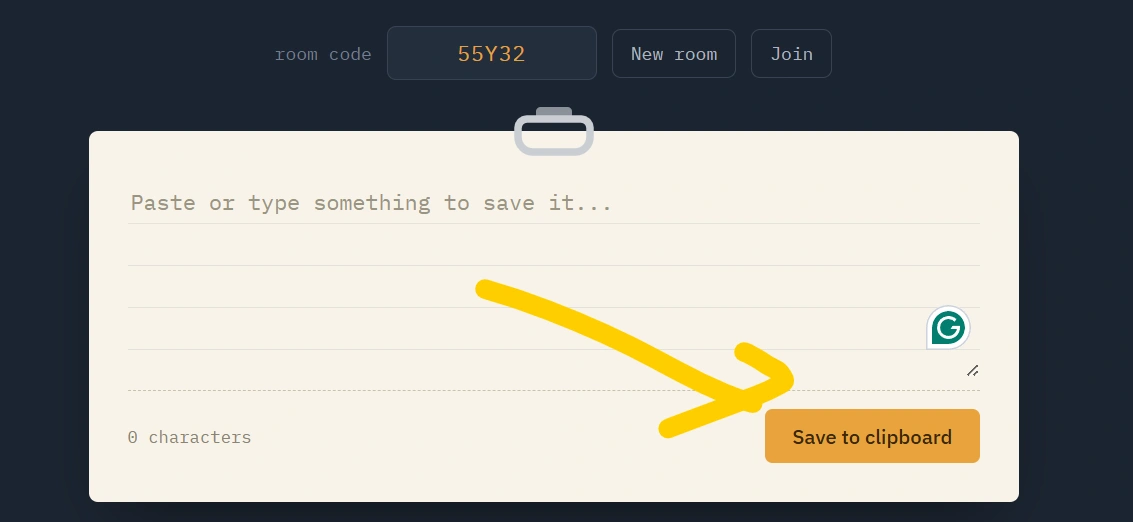
Open the online clipboard webpage using a browser such as Chrome, Edge, Firefox, Safari, or another modern browser.
Step 2: Paste or Type Your Text
Copy text from another website, document, message, or application and paste it into the clipboard area.
You can also type text directly into the tool.
Step 3: Save Your Text
Depending on the tool’s design, your text may be kept in the current browser session or saved locally in your browser.
Step 4: Copy Whenever You Need It
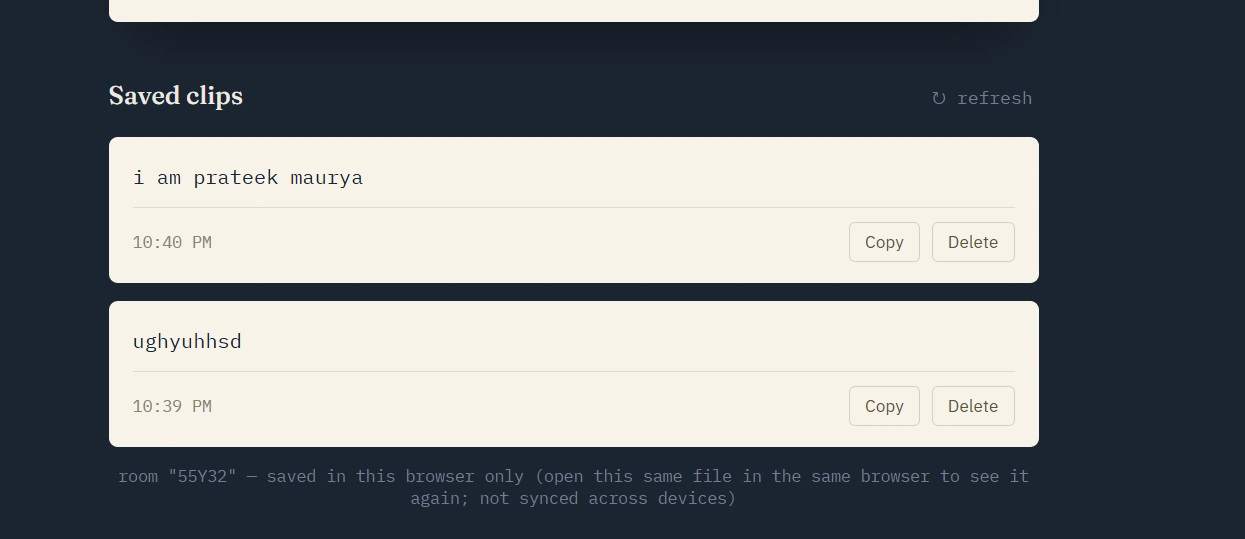
When you need the text again, simply click the Copy button and paste it wherever you want.
This makes an Online Clipboard particularly useful when repeatedly using the same text.
Why Use an Online Clipboard?
There are many situations where an online clipboard can save time.
1. Quickly Store Frequently Used Text
You can temporarily keep information such as:
- Email templates
- Short messages
- Code snippets
- Website URLs
- Notes
- Addresses
- Frequently used phrases
- HTML snippets
- CSS code
- JavaScript code
Instead of repeatedly searching for the same information, you can keep it in your clipboard workspace.
2. Easy Copy and Paste
An Online Clipboard can provide dedicated copy buttons, making it easier to copy individual pieces of text.
This is particularly useful when working with long pages containing multiple pieces of information.
3. Useful for Developers
Developers frequently copy code between editors, browsers, documentation, and other applications.
An online clipboard can be useful for temporarily storing:
It can act as a simple temporary workspace for frequently copied snippets.
4. Helpful for Students
Students can use an Online Clipboard for temporarily storing:
- Study notes
- Definitions
- Important questions
- Formulas
- URLs
- Assignment references
- Short pieces of research
Because the tool works in a browser, there is generally no software installation required.
5. Convenient on Mobile Devices
Typing and copying text on smartphones can sometimes be inconvenient.
A mobile-friendly Online Clipboard can provide a larger text area and dedicated buttons for copying and managing information.
Online Clipboard vs Traditional Clipboard
Your computer or smartphone already has a built-in clipboard. So why would you need an online clipboard?
The two systems serve slightly different purposes.
| Feature | Traditional Clipboard | Online Clipboard |
|---|---|---|
| Copy and paste | Yes | Yes |
| Works in browser | Yes | Yes |
| Multiple text items | Depends on device | Often available |
| Text editing | Limited | Often available |
| Dedicated copy buttons | Usually no | Yes |
| No installation | Yes | Yes |
| Cross-device functionality | Depends on OS/account | Depends on tool |
| Browser-based | No | Yes |
An Online Clipboard should therefore be considered a convenient additional workspace rather than a complete replacement for your operating system’s clipboard.
Is an Online Clipboard Free?
Many browser-based clipboard tools can be used for free. However, features differ between individual services.
A basic free online clipboard may allow you to:
- Paste text
- Edit text
- Copy text
- Delete text
- Create clipboard entries
- Use the tool from a browser
Advanced services may offer additional functionality such as accounts, synchronization, longer-term storage, or collaboration.
Before storing sensitive information, always check how the particular service handles and stores your data.
Is Online Clipboard Safe?
Security depends heavily on how the specific online clipboard has been designed.
Users should avoid putting highly sensitive information into an online clipboard unless they fully understand how the service stores and protects that information.
Avoid storing information such as:
- Passwords
- Banking credentials
- Credit/debit card information
- Private authentication codes
- Confidential business documents
- Personal identity information
For ordinary text, notes, snippets, and non-sensitive information, a well-designed clipboard tool can be convenient.
Important: A webpage should not be assumed to be private simply because it is using HTTPS. Users should understand whether information is stored locally in their browser, sent to a server, or retained in an account.
Online Clipboard for Copy and Paste
One of the most common uses of an Online Clipboard is simple copy and paste.
Imagine you have a paragraph that you need to paste into several different places.
Instead of repeatedly finding the original paragraph, you can:
Copy → Paste into Online Clipboard → Click Copy → Paste wherever needed
This can reduce repetitive work and make everyday internet tasks more convenient.
Online Clipboard for Text Management
A useful online clipboard can do more than simply hold one piece of text.
For example, you could create separate clipboard sections for:
Work
Frequently used work messages and templates.
Study
Notes, formulas, definitions, and useful resources.
Development
Code snippets, commands, and configuration examples.
Personal
Non-sensitive text that you frequently reuse.
This approach can turn an online clipboard into a lightweight text management tool.
Online Clipboard for Developers
Developers often switch between multiple applications and browser tabs.
An Online Clipboard can provide a temporary place to keep snippets while working.
For example:
A developer can paste this snippet into an online clipboard and quickly copy it while testing different versions of a webpage.
It can also be useful for storing:
- CSS snippets
- JavaScript functions
- SQL queries
- JSON data
- Regular expressions
- Linux commands
- API endpoints
- Configuration values
However, developers should never store API keys, passwords, private tokens, or other secrets in an online clipboard.
Online Clipboard on Mobile
Modern users frequently move between smartphones, tablets, and computers.
A responsive Online Clipboard can make copying and managing text easier on smaller screens.
A mobile-friendly design should include:
- Large text input area
- Easy-to-tap buttons
- Clear Copy button
- Delete/Clear button
- Responsive layout
- Fast loading
- Simple navigation
A good interface should work without requiring users to install a separate mobile application.
Key Features of a Good Online Clipboard
If you are looking for an Online Clipboard, consider the following features.
Fast Performance
The tool should load quickly and respond immediately when copying or editing text.
Simple Interface
Users should understand how to use the clipboard without reading complicated instructions.
Mobile Support
The tool should work properly on smartphones and tablets.
One-Click Copy
A dedicated copy button makes copying text much easier.
Text Editing
Users should be able to modify text before copying it.
Clear Data Option
A clear or delete button allows users to remove temporary information.
Privacy
A good clipboard tool should clearly explain whether data is stored locally or uploaded to a server.
Benefits of Using an Online Clipboard
The biggest benefit of an Online Clipboard is convenience.
Time Saving
Frequently used text can be kept in one place instead of being repeatedly searched for.
No Software Installation
Because it works through a browser, there may be no need to download a separate program.
Easy Access
You can use the tool whenever the website is available.
Simple Text Organization
Multiple pieces of text can be managed in a single workspace.
Useful for Different Users
Students, developers, writers, teachers, office workers, and general internet users can all benefit from clipboard functionality.
How to Choose the Best Online Clipboard
Before using an online clipboard, look for these qualities:
- Easy to use
- Fast loading
- Mobile responsive
- Clear privacy policy
- Simple copy functionality
- Easy text deletion
- No unnecessary installation
- Secure connection
- Useful text-management features
- Transparent data-storage practices
A simple tool that performs its main task well is often better than a complicated clipboard filled with unnecessary features.
Frequently Asked Questions About Online Clipboard
What is an Online Clipboard?
An Online Clipboard is a browser-based tool that allows you to store, edit, manage, and copy text online.
Is an Online Clipboard free?
Many online clipboard tools provide basic clipboard functionality for free, although features vary between services.
Can I use an Online Clipboard on my phone?
Yes. A responsive online clipboard can be used from smartphones and tablets through a web browser.
Do I need to install software?
Usually, no. Browser-based clipboard tools are designed to work directly through a web browser.
Can I store multiple texts?
Some online clipboard tools support multiple entries, while others are designed for a single temporary text area.
Is an Online Clipboard safe for passwords?
It is generally better not to store passwords or other highly sensitive information in a generic online clipboard unless you specifically trust and understand its security model.
Can developers use an Online Clipboard?
Yes. Developers can use one for temporary code snippets, commands, JSON, SQL queries, and other non-sensitive development text.
Does an Online Clipboard work on Android and iPhone?
A browser-based clipboard can work on both Android and iPhone if the website is properly optimized for mobile browsers.
Final Thoughts
An Online Clipboard is a simple but useful browser-based solution for managing text. It can help you copy, store, edit, and reuse information without repeatedly switching between applications.
From students and content writers to developers and office professionals, many people can benefit from having a convenient online copy-and-paste workspace.
If you frequently work with text, code snippets, notes, URLs, or reusable messages, an Online Clipboard can help make your daily workflow faster and more organized.
Try an Online Clipboard today and make copy-and-paste tasks simpler, faster, and more convenient.