Fake Call Generator — Simulate a Realistic Incoming Call Online
A fake call generator is a free browser tool that shows a realistic incoming call screen on your phone or laptop — without dialling a real number, using your SIM, or costing you anything. This page lets you set a caller name, a phone number, an optional photo, and a delay, then triggers a lock‑screen style call alert on demand. It's built for quick, harmless situations: stepping out of an awkward date, leaving a long meeting, testing how a call screen looks in an app design, or simply pranking a friend.
How to use the fake call generator
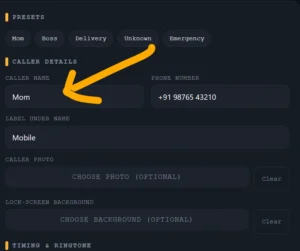
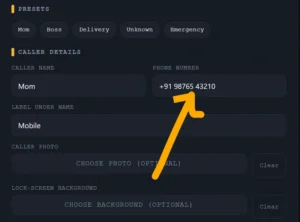
- Pick a quick preset (Mom, Boss, Delivery, Unknown, Emergency) or type your own caller name and number.
- Optionally upload a photo so the incoming call looks like a real saved contact.
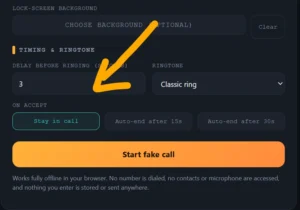
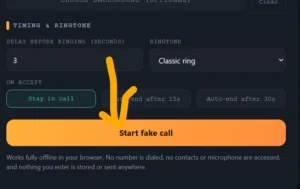
- Set a delay in seconds — the call will start ringing automatically once the countdown ends, so you can put your phone down and wait for it to go off.
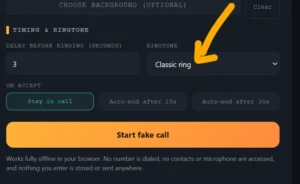
- Choose a ringtone style, or pick silent if you only want the screen and vibration.
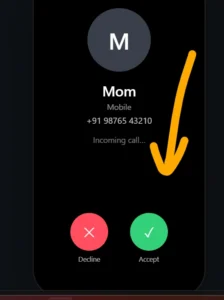
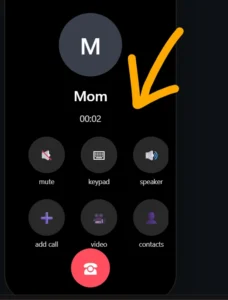
- Tap Start fake call. When the alert appears, use Accept to see the in‑call screen with a live timer, or Decline to dismiss it.
What you can customise
- Caller name and number — anything you like, including short labels like "Boss" or "Emergency".
- Photo — upload any image to appear as the caller's contact photo.
- Background — set a custom lock‑screen wallpaper for a more convincing look.
- Timing — ring instantly or after a set delay, so it doesn't look staged.
- Ringtone — classic ring, digital pulse, soft marimba, or silent with vibration only.
Common ways people use this tool
- Polite exit: set an "Emergency" caller with a short delay to step away from a meeting, date, or gathering.
- Pranks: use a funny caller name and photo to surprise a friend or family member.
- UI and design testing: preview how an incoming call layout looks with real content before building it into an app.
- Practice and demos: rehearse a phone conversation flow, or demonstrate a call screen in a presentation, without placing a real call.
Why this tool is safe to use
- No real call is placed — nothing is dialled, and no telecom charges apply.
- No app install, sign‑up, or permissions are needed; it runs entirely in your browser tab.
- It does not read your contacts, microphone, or camera roll — you choose what to upload, and it stays on your device.
- No data is saved or sent anywhere once you close or refresh the page.
Frequently asked questions
Does this generator make a real phone call?
No. It only displays a simulated incoming call screen in your browser. No number is dialled and no network call is placed.
Is it free to use?
Yes, the tool is completely free, with no sign‑up or app download required.
Will it work on my phone in India?
Yes — it works on any modern mobile or desktop browser, on any network or carrier, since no actual call or SIM connection is involved.
Can I add a photo to the fake caller?
Yes, you can upload any image as the caller's photo before starting the call, and it's only used locally in your browser.
Is any of my data stored?
No. Names, numbers, and photos you enter stay on your device for the current session only and are not uploaded anywhere.
Can this be used to prank or deceive someone seriously?
The tool is meant for light entertainment, demos, and polite exits. It should not be used for harassment, fraud, or deceiving anyone in a harmful way.