YouTube Thumbnail Downloader
A YouTube Thumbnail Downloader is a simple online tool that allows you to extract and download the thumbnail image used on a YouTube video. Instead of taking a screenshot or searching for the thumbnail manually, you can simply enter a YouTube video URL and get the available thumbnail image.
Whether you are a content creator, blogger, designer, student, marketer, or YouTube viewer, a youtube thumbnail downloader can make it much easier to access video thumbnail images for legitimate purposes.
Our online tool is designed to be fast, free, easy to use, and mobile-friendly. No complicated software installation is required.
What Is a YouTube Thumbnail?
A YouTube thumbnail is the preview image displayed before a video is played. It is one of the first things viewers see when browsing YouTube.
Creators use thumbnails to:
- Attract viewers’ attention
- Explain what a video is about
- Create a consistent channel design
- Highlight important information
- Improve the visual appearance of their videos
Because thumbnails are important for video discovery, creators and designers may sometimes need to view or download them for reference, analysis, or other permitted uses.
What Is a YouTube Thumbnail Downloader?
A youtube thumbnail downloader is an online utility that extracts the thumbnail associated with a YouTube video.
Normally, you may need to find the correct image URL manually or take a screenshot from the video. A thumbnail downloader simplifies this process.
How it works
- Copy the YouTube video URL.
- Open the YouTube Thumbnail Downloader.
- Paste the URL into the input box.
- Click the Download or Get Thumbnail button.
- Preview the available thumbnail.
- Download the image to your device.
The entire process can usually be completed within a few seconds.
How to Use Our YouTube Thumbnail Downloader
Using our youtube thumbnail downloader is easy, even if you have never used an online image tool before.
Step 1: Copy the YouTube URL
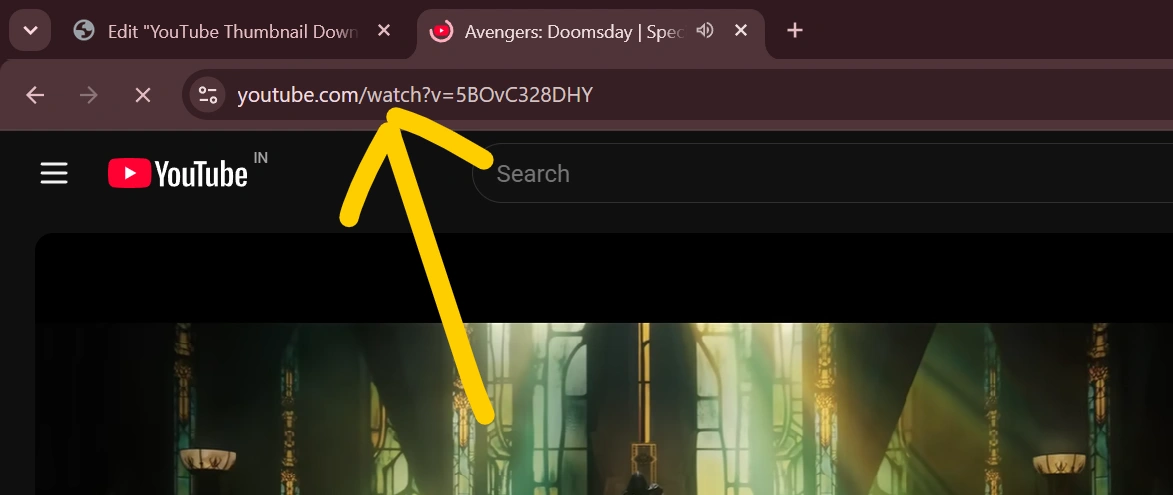
Open the YouTube video whose thumbnail you want to access. Copy its URL from your browser or the YouTube sharing option.
Step 2: Paste the URL
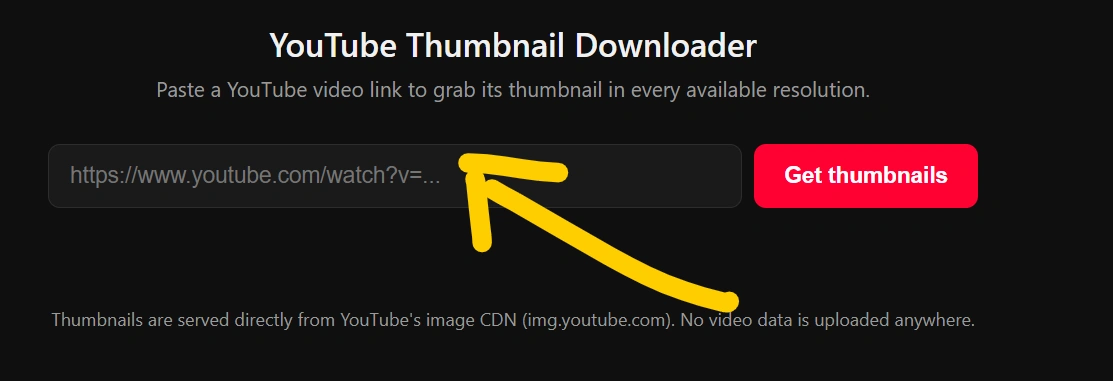
Paste the copied URL into the YouTube Thumbnail Downloader input field.
Step 3: Generate the Thumbnail
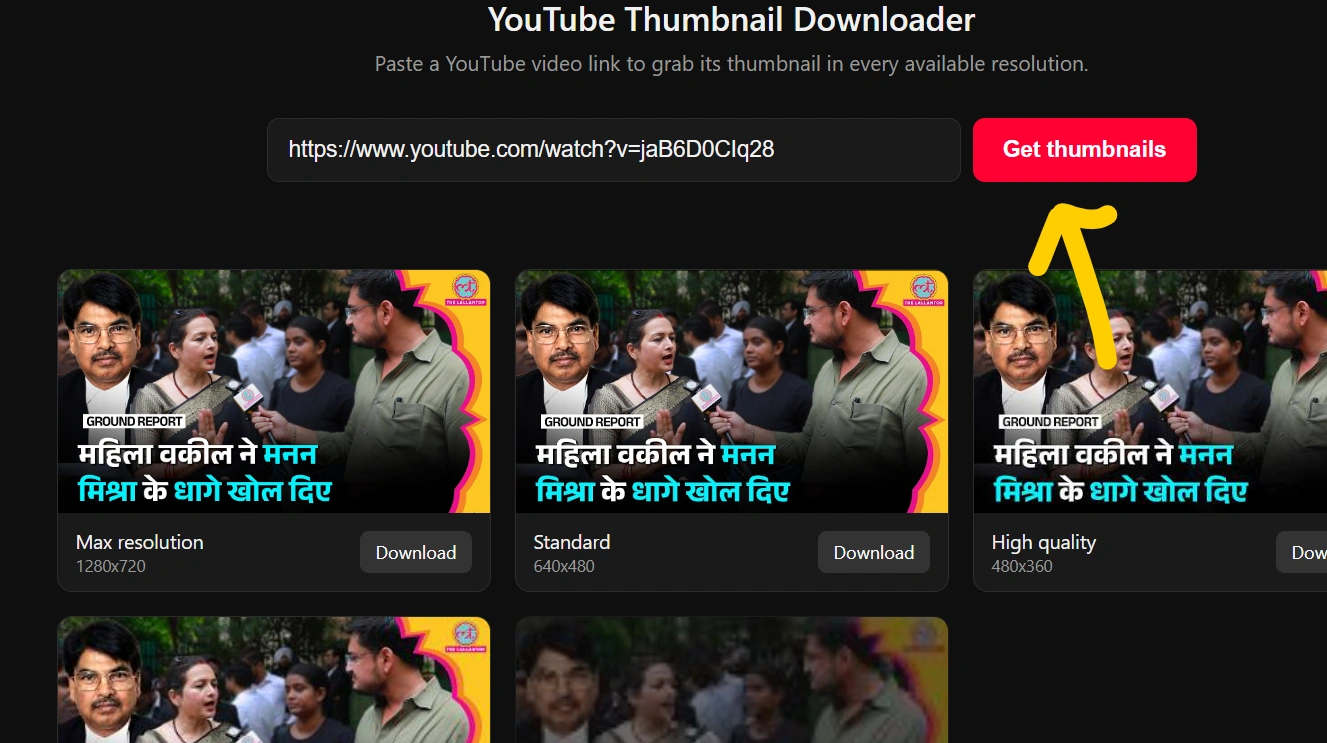
Click the Get Thumbnail button. The tool processes the video URL and displays the available thumbnail.
Step 4: Preview the Image
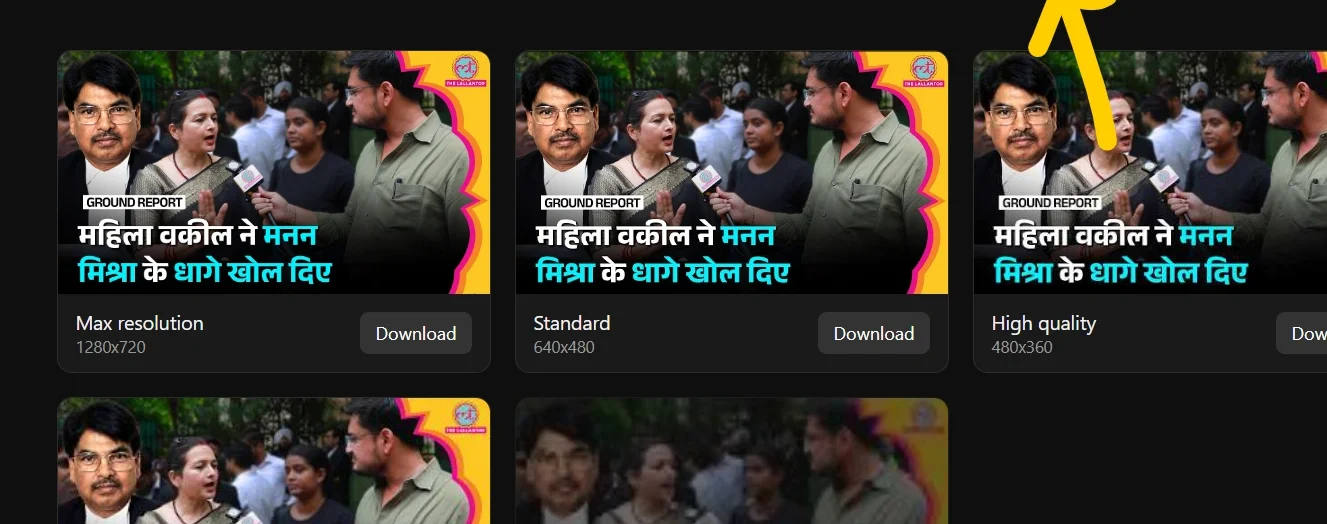
Check the generated thumbnail before downloading it.
Step 5: Download
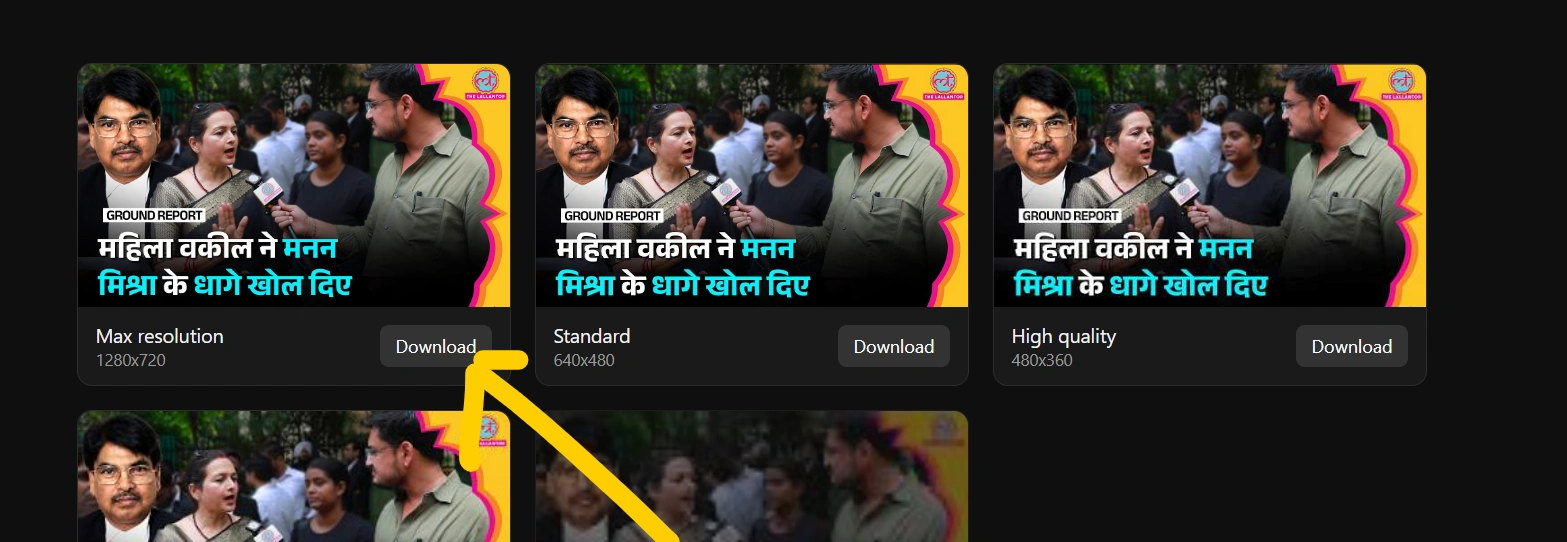
Click the Download button to save the thumbnail image to your device.
That’s it. You don’t need to install an additional application.
YouTube Thumbnail Downloader HD
Many users search for a YouTube thumbnail downloader HD because they want a higher-quality version of a video’s thumbnail.
Depending on the video and the thumbnail made available by YouTube, different image resolutions may exist. Our tool can display the available thumbnail versions when they can be retrieved.
Possible quality options may include:
- Standard quality
- Medium quality
- High quality
- HD quality
- Full HD quality
The actual resolution depends on the thumbnail available for the particular video.
YouTube Thumbnail Downloader for Mobile
You don’t need a computer to use a youtube thumbnail downloader.
Our tool can be designed to work with:
- Android smartphones
- iPhones
- Tablets
- Windows computers
- Mac computers
- Other modern browsers
Simply open the tool in your mobile browser, paste the YouTube video URL, and generate the thumbnail.
A responsive design makes the process convenient on smaller screens.
Why Use a YouTube Thumbnail Downloader?
There are several reasons people use a YouTube thumbnail downloader.
1. Fast Thumbnail Access
Instead of manually searching for an image, you can enter the video URL and retrieve the thumbnail quickly.
2. No Software Installation
A browser-based tool doesn’t require you to install additional image-editing software.
3. Easy to Use
The process requires only a YouTube video URL and a few clicks.
4. Useful for Creators
YouTube creators can use the tool to inspect thumbnails, compare designs, and study how different creators present their videos.
5. Helpful for Designers
Designers can use thumbnails as references when developing their own original thumbnail concepts.
6. Works Across Devices
A responsive online tool can be accessed from both computers and smartphones.
YouTube Thumbnail Downloader vs Screenshot
You can technically capture a thumbnail by taking a screenshot, but this isn’t always the best approach.
| Feature | Thumbnail Downloader | Screenshot |
|---|---|---|
| Original thumbnail | Usually available | Not necessarily |
| Image quality | Depends on available source | Depends on screen |
| Cropping required | Usually no | Often required |
| Speed | Fast | Manual |
| Mobile friendly | Yes | Yes |
| Requires software | No | No |
A youtube thumbnail downloader is generally more convenient when you specifically need the thumbnail image rather than a screenshot of your screen.
What YouTube Thumbnail Sizes Are Available?
YouTube can provide thumbnails in different resolutions depending on the video and available image resources.
Common thumbnail variants may include sizes such as:
- 120 × 90 pixels – small thumbnail
- 320 × 180 pixels – medium thumbnail
- 480 × 360 pixels – standard thumbnail
- 640 × 480 pixels – larger thumbnail
- 1280 × 720 pixels – high-resolution thumbnail
Not every video necessarily has every version available, so the youtube thumbnail downloader should display only the formats that can actually be retrieved.
Is YouTube Thumbnail Downloader Free?
Yes, an online youtube thumbnail downloader can be offered completely free of charge.
Users can simply:
Paste URL → Generate Thumbnail → Preview → Download
There is no need for complicated registration or specialized software when using a browser-based tool.
Can I Download a YouTube Thumbnail Without Installing an App?
Yes. A web-based youtube thumbnail downloader works directly inside a browser.
You can use it through browsers such as:
- Google Chrome
- Microsoft Edge
- Mozilla Firefox
- Safari
- Opera
- Other modern browsers
This makes the tool convenient for users who don’t want to install another application.
YouTube Thumbnail Downloader for Content Creators
Thumbnails play an important role in YouTube content strategy. Creators can use a thumbnail downloader to research how thumbnails are designed across different channels.
For example, creators can study:
- Font placement
- Image composition
- Text size
- Background design
- Subject positioning
- Use of contrast
- Branding
- Visual hierarchy
However, downloading an image does not automatically give you permission to republish or commercially use someone else’s copyrighted thumbnail.
Can You Use Downloaded YouTube Thumbnails?
This depends on how you intend to use the image and who owns the relevant rights.
A thumbnail may contain copyrighted photographs, graphics, logos, artwork, or other protected material. Downloading an image for personal reference is different from republishing it on a website, social media account, advertisement, or commercial project.
Always respect the copyright and intellectual-property rights of the original creator.
If you plan to reuse a thumbnail publicly or commercially, make sure you have the appropriate permission or legal basis to do so.
Is a YouTube Thumbnail Downloader Safe?
A browser-based thumbnail downloader doesn’t need access to your YouTube account simply to retrieve a publicly available video thumbnail.
For a privacy-friendly tool, users should look for:
- No unnecessary account registration
- No requirement to provide personal information
- HTTPS connection
- Simple URL processing
- Clear privacy policy
- No unnecessary file uploads
Our goal is to keep the thumbnail downloading process simple and convenient.
Tips for Creating Better YouTube Thumbnails
If you’re using a youtube thumbnail downloader to research other creators’ thumbnails, you can also apply what you learn to your own designs.
Keep text readable
Use short text that can be understood even on a small mobile screen.
Use strong visual elements
A clear subject can make a thumbnail easier to recognize.
Avoid excessive text
Too much information can make a thumbnail difficult to understand.
Maintain consistent branding
Using similar fonts, layouts, or visual elements can help viewers recognize your channel.
Design for mobile screens
A large percentage of YouTube viewing happens on mobile devices, so make sure your thumbnail remains understandable at smaller sizes.
Frequently Asked Questions
What is a YouTube Thumbnail Downloader?
A youtube thumbnail downloader is an online tool that retrieves the thumbnail image associated with a YouTube video and allows the available image to be saved.
How do I download a YouTube thumbnail?
Copy the YouTube video URL, paste it into the downloader, generate the thumbnail, preview it, and click the download button.
Is YouTube Thumbnail Downloader free?
Many online thumbnail downloader tools are free to use. Our tool is designed to provide a simple and convenient thumbnail downloading experience.
Can I use the YouTube Thumbnail Downloader on my phone?
Yes. A responsive web-based downloader can work on Android phones, iPhones, and tablets using a modern browser.
Can I download HD YouTube thumbnails?
If a high-resolution thumbnail is available for the video, the tool can retrieve the available high-quality version.
Do I need to install software?
No. A browser-based youtube thumbnail downloader can work directly online.
Can I download thumbnails from any YouTube video?
The result depends on whether the video is publicly accessible and whether the thumbnail can be retrieved. Private, restricted, removed, or otherwise inaccessible videos may not work.
Does downloading a thumbnail mean I can republish it?
No. Downloading an image does not automatically transfer copyright or usage rights. Always consider the creator’s rights and obtain permission when required.
YouTube Thumbnail Downloader – Simple, Fast & Convenient
Finding a YouTube thumbnail shouldn’t require complicated software or technical knowledge. With a youtube thumbnail downloader, you can simply paste a video URL and retrieve the available thumbnail image.
Whether you’re a creator researching thumbnail designs, a designer looking for visual references, or a user who needs access to a video’s preview image, an online thumbnail downloader can save time and simplify the process.