Convert Text into PDF Online
Need to turn a text document into a professional PDF file? Our convert text into PDF tool makes it quick and simple. You can enter or paste your text, format your content, and create a downloadable PDF directly from your browser.
Whether you need to convert notes, assignments, articles, letters, applications, reports, or other text content, a text to PDF converter can save time and eliminate the need for complicated software.
With our online convert text into PDF tool, you can create PDF documents from plain text without installing additional applications.
What Is Convert Text into PDF?
Convert text into PDF means transforming plain text into a Portable Document Format (PDF) file. PDF is one of the most widely used document formats because it maintains the appearance of content across different devices and operating systems.
For example, if you have text like:
Name: Rahul Kumar
Subject: Computer Science
Assignment: Web Development
You can use a convert text into PDF tool to turn this content into a properly formatted PDF document.
The resulting PDF can be saved, shared, printed, or uploaded to websites and online forms.
How to Convert Text into PDF Online
Using our online text-to-PDF tool is simple. You generally don’t need any technical knowledge.
Step 1: Enter Your Text

Open the convert text into PDF tool and type your content into the text box. You can also paste text copied from another application.
Step 2: Format Your Content
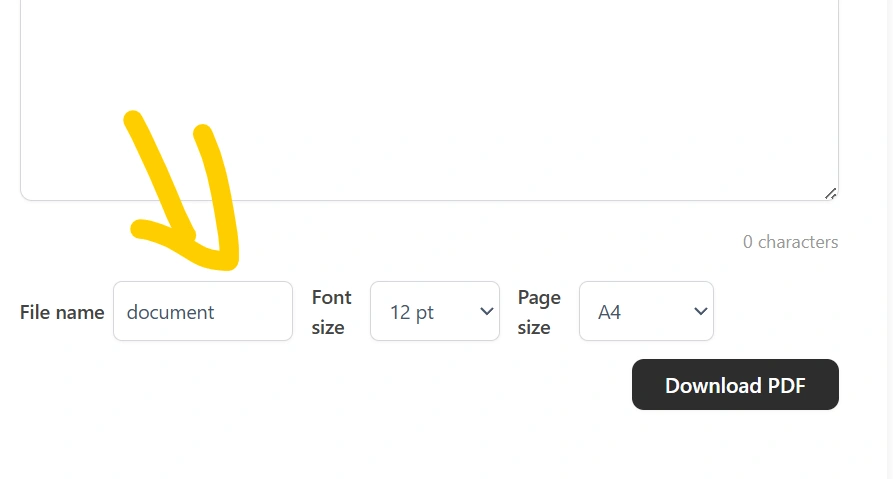
Depending on the available options, you can adjust settings such as:
- Font size
- Font style
- Text alignment
- Page size
- Margins
- Line spacing
- Text color
Proper formatting can make your PDF easier to read.
Step 3: Create the PDF
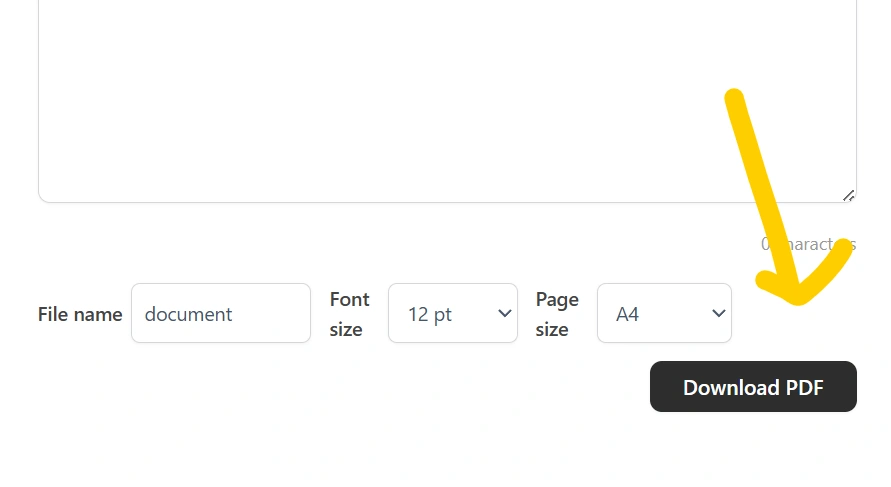
Click the Convert to PDF or Generate PDF button. The tool processes your text and creates a PDF document.
Step 4: Download Your PDF
Once the PDF has been generated, download it to your device. You can then open it using any standard PDF reader.
Why Use a Text to PDF Converter?
A convert text into PDF tool can be useful in many situations.
1. No Software Installation
You don’t necessarily need Microsoft Word, Adobe Acrobat, or other desktop applications. An online tool can let you create a PDF directly from your web browser.
2. Quick Conversion
Converting a short text document manually can take unnecessary time. An online text to PDF converter can simplify the process.
3. Easy to Use
The conversion process is designed to be straightforward. Enter your text, select your preferred options, generate the document, and download it.
4. Useful for Students
Students can use a convert text into PDF tool to create PDFs from:
- Class notes
- Assignments
- Project information
- Study material
- Practical records
- Short reports
5. Useful for Professionals
Professionals can convert text into PDF for:
- Business letters
- Reports
- Meeting notes
- Instructions
- Simple documents
- Internal communication
Convert Text into PDF on Mobile
You can also use a convert text into PDF tool on smartphones and tablets if the tool is designed to work in a web browser.
This can be particularly useful when you don’t have access to a computer. Simply open the tool, enter your text, generate the PDF, and save the resulting file.
A mobile-friendly interface makes it easier to create documents while travelling, studying, or working remotely.
Convert Text into PDF Without Installing an App
One of the biggest advantages of an online converter is convenience. If you only need to create a PDF occasionally, installing dedicated PDF software may not be necessary.
A browser-based convert text into PDF tool can provide a convenient alternative.
You can use it from supported browsers on:
- Windows computers
- Mac computers
- Android phones
- iPhones and iPads
- Tablets
- Other modern devices
What Can You Convert from Text to PDF?
Almost any ordinary text content can be placed into a PDF document.
Examples include:
Notes
Turn plain notes into a PDF that is easier to save and share.
Assignments
Students can prepare text-based assignments and create a PDF for submission.
Applications
Create simple application letters or requests in PDF format.
Reports
Convert written reports into a document that can be printed or shared.
Articles
Bloggers and writers can save text-based articles as PDF files.
Lists
Create PDF versions of checklists, instructions, schedules, or other text-based information.
Benefits of PDF Format
PDF is popular because it is designed for consistent document presentation.
Some important advantages include:
- Easy to share
- Suitable for printing
- Works across different devices
- Maintains document layout
- Easy to archive
- Commonly accepted for online submissions
- Can be opened using many PDF readers
This makes PDF a practical format for documents that need to be shared with other people.
Convert Text into PDF vs Copy and Paste into Word
There are different ways to create a PDF. You could paste your content into a word processor, format the document, and export it as PDF.
However, for simple text documents, an online convert text into PDF tool can be faster.
| Feature | Online Text to PDF Tool | Word Processor |
|---|---|---|
| Simple text conversion | ✅ Easy | Requires more steps |
| Software installation | Usually not required | May be required |
| Quick PDF creation | ✅ | Yes |
| Advanced document editing | Limited | ✅ |
| Suitable for simple documents | ✅ | ✅ |
| Browser-based | ✅ | Depends on software |
If your goal is simply to turn text into a PDF, a dedicated converter can be a convenient option.
Is Convert Text into PDF Free?
Many online text-to-PDF tools provide free conversion for normal text documents. Our tool is designed to make basic PDF creation simple and accessible.
Before using any online service, check the tool’s current features, limits, and privacy information.
Is My Text Safe When Using an Online Converter?
Privacy is important when working with documents.
For sensitive information such as passwords, financial information, government identification numbers, or confidential business documents, always check how a website handles uploaded or entered content before using it.
If a converter processes text directly in your browser without sending it to a server, that can provide an additional privacy advantage.
Tip: Avoid entering highly sensitive personal information into online tools unless you understand how that service handles your data.
Who Can Use a Text to PDF Converter?
A convert text into PDF tool can be useful for almost anyone who needs a simple PDF.
Students
Create assignments, notes, and project documents.
Teachers
Prepare instructions, notes, and educational material.
Writers
Save written content in a portable format.
Bloggers
Create downloadable versions of text content.
Office Workers
Create simple reports, letters, and documents.
Freelancers
Prepare basic documents for clients.
General Users
Convert everyday text into a shareable PDF.
Tips for Creating a Better PDF
Before converting your text, follow these simple tips:
Use Clear Headings
Separate different sections using headings so the document is easier to read.
Keep Paragraphs Short
Large blocks of text can be difficult to read. Use shorter paragraphs where appropriate.
Check Spelling
Review your content before generating the final PDF.
Use Appropriate Font Sizes
Avoid extremely small text. Choose a readable font size for normal documents.
Review the PDF
After downloading the file, open it and check that the formatting looks correct.
Common Uses of Convert Text into PDF
People search for convert text into PDF for many different purposes. Some common examples include:
- Convert notes into PDF
- Convert TXT to PDF
- Convert written content into PDF
- Convert text files into PDF
- Convert assignments into PDF
- Convert letters into PDF
- Convert articles into PDF
- Convert plain text into PDF
- Create PDF from text
- Make a PDF from copied text
A simple converter can handle many of these everyday requirements.
Frequently Asked Questions
How do I convert text into PDF?
Enter or paste your text into an online convert text into PDF tool, adjust the available formatting options, click the conversion button, and download the generated PDF.
Can I convert text into PDF on my phone?
Yes. If the converter is mobile-friendly, you can use it through a smartphone browser.
Do I need Microsoft Word to create a PDF?
No. A browser-based text-to-PDF converter can create a PDF without requiring Microsoft Word.
Can I convert a TXT file into PDF?
Yes, depending on the tool’s features. A text-to-PDF converter can convert plain text or TXT content into PDF format.
Is PDF better than TXT for sharing?
PDF is often more suitable when you want to preserve document presentation and make the file convenient for printing and sharing.
Can I edit the PDF after conversion?
A PDF can be edited using compatible PDF editing software, but the available editing options depend on the software you use.
Does converting text into PDF change the original text?
Normally, conversion creates a separate PDF version of your content. Your original text remains unchanged unless you overwrite or delete it yourself.
Can I print the converted PDF?
Yes. Once your PDF has been generated and downloaded, you can print it using a compatible printer.
Conclusion
If you need a quick way to create a PDF from plain text, an online convert text into PDF tool can be a convenient solution. Instead of installing complicated software, you can enter your content, format it, generate a PDF, and save the finished document.
From student assignments and personal notes to letters and simple reports, converting text into PDF can make your content easier to share, print, and store.