Sign a PDF without uploading it anywhere
Choose a document, draw or type your signature, then drag it into place. The file never leaves this browser tab.
Your signature
Once created, click the page to drop it in, then drag or resize.
Create your signature
Digitally Sign PDF Online Easily
In today’s digital world, many documents are shared electronically instead of being printed on paper. Contracts, applications, invoices, agreements, forms, and business documents are commonly sent as PDF files. When a document requires your signature, printing it, signing it, scanning it, and sending it back can take unnecessary time.
That is where the ability to digitally sign PDF documents becomes useful.
A digital PDF signing tool can help you add your signature to a document without going through the traditional printing and scanning process. Depending on the tool and type of signature used, you may be able to draw your signature, type your name, upload a signature image, or apply a digital certificate.
In this guide, we will explain how to digitally sign a PDF, the different types of PDF signatures, important security considerations, and common questions users may have.
What Does It Mean to Digitally Sign a PDF?
To digitally sign PDF documents means adding a signature electronically to a PDF file.
However, an important distinction is worth understanding: an electronic signature and a certificate-based digital signature are not always the same thing.
An electronic signature can be a typed name, drawn signature, or an inserted image of a handwritten signature. A certificate-based digital signature uses a digital certificate and cryptographic technology to help verify the signer and detect changes to the document after signing.
The type of signature you need depends on the purpose of the document and the requirements of the organization receiving it.
How to Digitally Sign PDF Online
If you need to sign a PDF quickly, the general process is straightforward.
Step 1: Open Your PDF Signing Tool
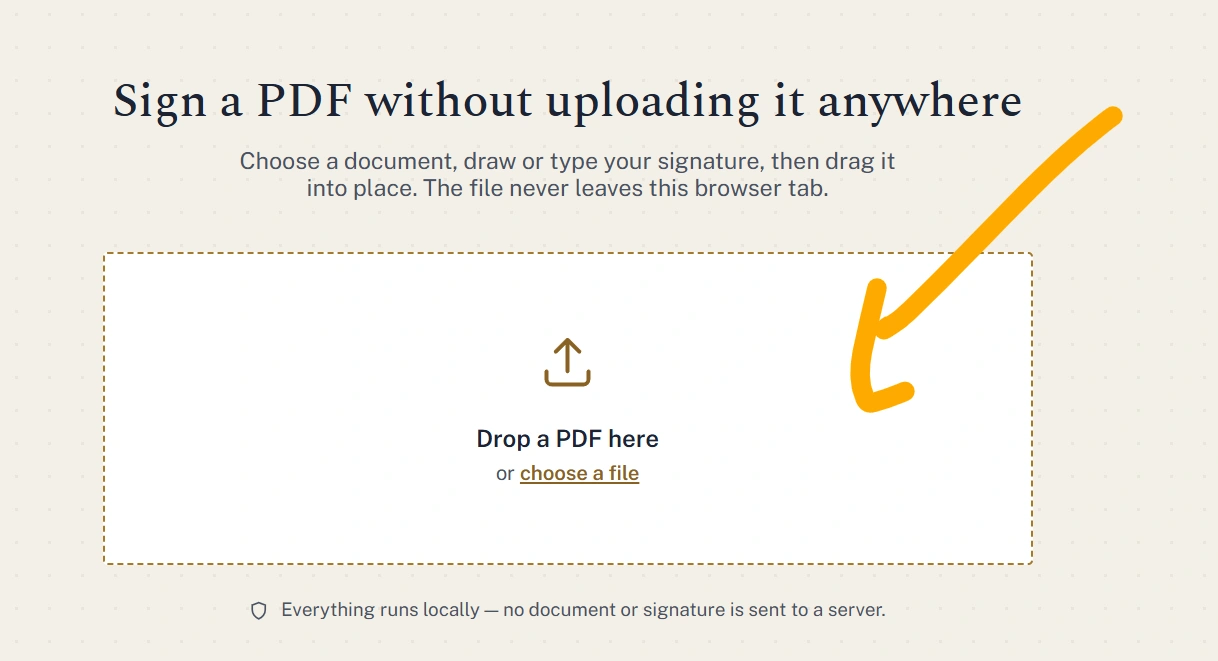
Open your PDF signing tool and look for an option such as Upload PDF, Choose PDF, or Select File.
Step 2: Upload Your PDF
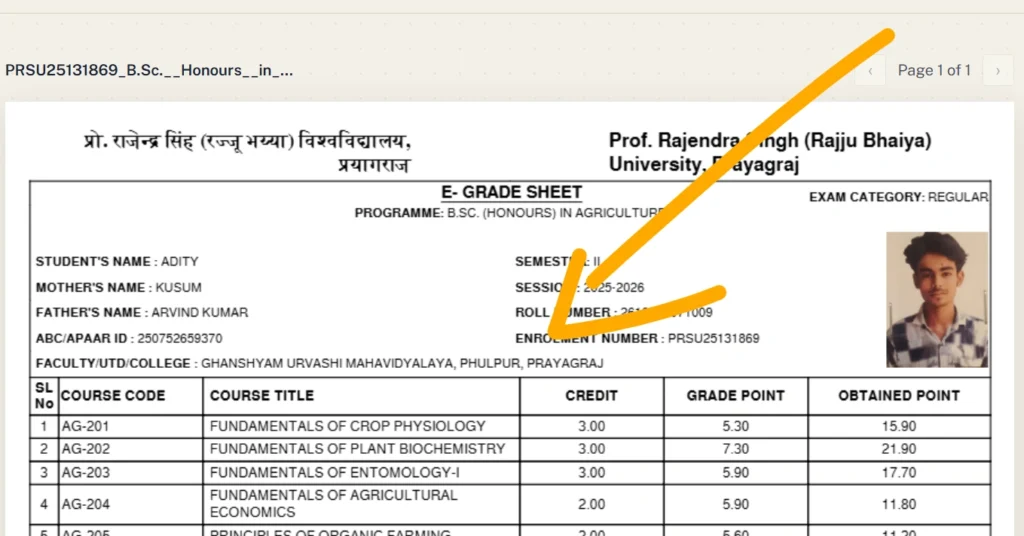
Select the PDF document that you want to sign.
Before uploading a document containing private information, check the tool’s privacy policy and understand how uploaded files are handled.
Step 3: Add Your Signature
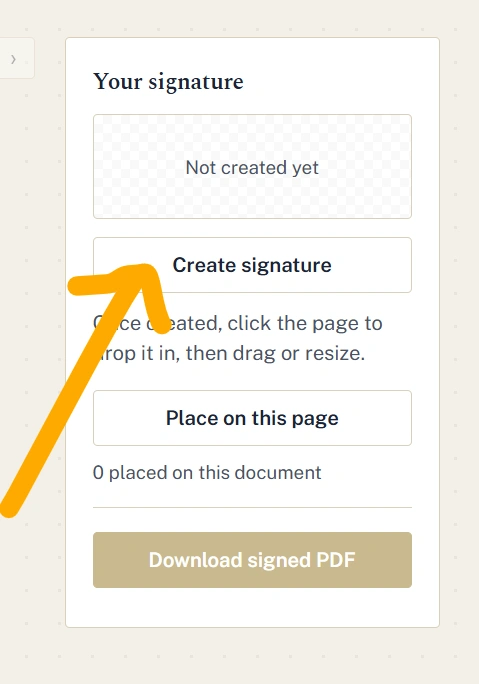
Depending on the available features, you may be able to:
- Draw your signature
- Type your name
- Upload a signature image
- Place an existing signature
- Use a certificate-based digital signature
Choose the method that matches your requirements.
Step 4: Position the Signature
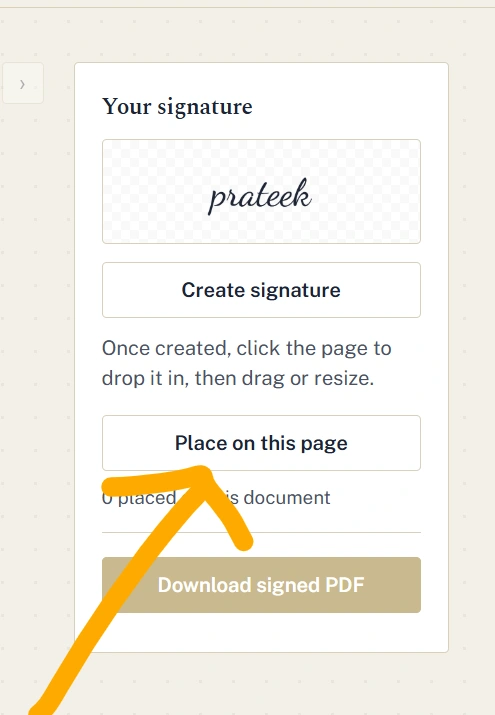
Place your signature in the appropriate location on the PDF.
Check the document carefully to make sure the signature does not cover important text, numbers, dates, or other information.
Step 5: Review the Document
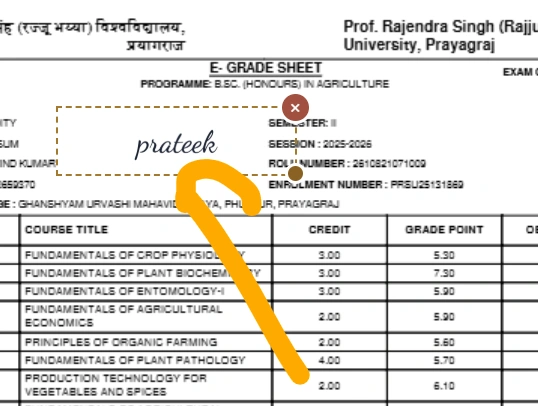
Before saving the signed PDF, check:
- Your name
- Signature position
- Date
- Important document information
- Number of pages
- Any additional required fields
Taking a few seconds to review the document can help prevent mistakes.
Step 6: Save the Signed PDF
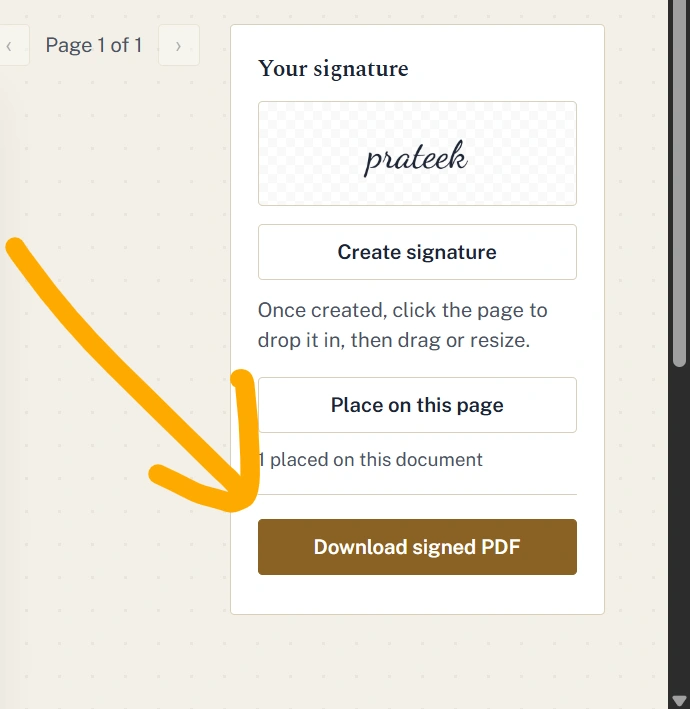
Once everything looks correct, save or download the signed PDF.
Your signed document is now ready to share when appropriate.
Why Digitally Sign PDF Documents?
There are several reasons people choose digital signing instead of printing documents.
1. Saves Time
You don’t need to print, manually sign, scan, and email the document again.
2. Reduces Paper Use
Digital signing can reduce the need for physical copies and unnecessary printing.
3. Convenient for Remote Work
People can sign documents from different locations without meeting physically.
4. Easy Document Sharing
After signing, the PDF can be shared electronically through the appropriate channel.
5. Keeps Documents Digital
If your workflow is already digital, signing PDFs electronically helps avoid converting documents back and forth between paper and digital formats.
Electronic Signature vs Digital Signature
These terms are sometimes used interchangeably, but they can refer to different technologies.
| Feature | Electronic Signature | Digital Signature |
|---|---|---|
| Basic signature | Yes | Yes |
| Can be typed or drawn | Often | Not usually the main method |
| Uses cryptography | Not necessarily | Yes |
| Digital certificate | Usually not required | Typically required |
| Helps detect document changes | Depends on system | Yes |
| Suitable for every legal situation | Depends on local rules and use | Depends on certificate and applicable rules |
If a company, government organization, or other institution specifically asks for a digital signature certificate, simply inserting an image of your handwritten signature may not meet its requirements.
Is It Safe to Digitally Sign PDF Files Online?
Security depends heavily on the tool you use and the type of signature.
Before using an online PDF signing service, look for information about:
- File encryption
- Data protection
- File retention
- Automatic file deletion
- Server security
- Privacy practices
- Whether documents are used for other purposes
For highly confidential documents, users should carefully evaluate the service before uploading the file.
You should also avoid uploading sensitive documents to an unfamiliar website simply because it offers a free service.
Can I Digitally Sign a PDF on My Phone?
Yes, many PDF applications and online tools work on smartphones and tablets.
The basic process is generally similar:
- Open the PDF signing tool.
- Select your PDF.
- Add your signature.
- Position the signature.
- Review the document.
- Save the signed PDF.
On a touchscreen device, drawing a signature can be particularly convenient.
Can I Digitally Sign a PDF Without Printing It?
Yes. You don’t necessarily need to print a PDF to add an electronic signature.
A suitable PDF signing tool can allow you to add a signature directly to the digital document. This can make the process considerably faster than printing and scanning.
However, remember that adding a visible signature is not automatically the same as applying a certificate-based digital signature.
Does a Digitally Signed PDF Become Legally Valid?
This depends on several factors, including the country, type of signature, document, applicable laws, and requirements of the organization receiving the document.
Some documents may require a specific type of digital signature, identity verification, or certificate. Other documents may accept a simpler electronic signature.
Therefore, if you are signing an important legal, financial, employment, or government document, check the requirements of the organization before choosing a signing method.
Common Uses for Digitally Signed PDFs
Digital PDF signing can be useful in many everyday situations.
Business Documents
Businesses can use electronic signatures for agreements, proposals, forms, and internal documents.
Job Applications
Some employers may request signed forms during the hiring process.
Invoices and Forms
Documents that require approval or acknowledgment can sometimes be signed electronically.
Contracts
Contracts may require signatures from multiple parties, depending on the agreement and applicable requirements.
Educational Documents
Students and institutions may use signed PDFs for applications, declarations, and administrative forms.
Frequently Asked Questions
What is the easiest way to digitally sign PDF?
The easiest method depends on the type of signature required. For a basic electronic signature, you can use a PDF signing tool that allows you to draw, type, or insert a signature.
Can I sign a PDF for free?
Some online PDF signing tools provide free signing features. However, check the service’s limitations and privacy policy before uploading important documents.
Can I add my handwritten signature to a PDF?
Yes. Some tools allow you to draw your signature using a mouse, touchscreen, or stylus. Others allow you to upload an image of your handwritten signature.
Does signing a PDF change the original document?
Adding a signature can modify the PDF file. For this reason, it is a good idea to keep the original unsigned document separately when you need to preserve it.
Can multiple people sign one PDF?
Many PDF signing systems support multiple signatures. The exact process depends on the software or service being used.
Is a scanned signature a digital signature?
Not necessarily. A scanned image of a handwritten signature is generally an electronic representation of a signature. A certificate-based digital signature uses cryptographic technology and a digital certificate.
Final Thoughts
The ability to digitally sign PDF documents can make everyday document workflows faster, more convenient, and less dependent on paper. Whether you’re signing a form, agreement, application, or business document, understanding the difference between an electronic signature and a certificate-based digital signature is important.
Before signing any important document, read its contents, verify the recipient, use a trustworthy signing method, and make sure the signature meets the requirements of the organization receiving the PDF.
Explore Our Tools
- Resize Signature Online: Free Tool to Resize Your Signature Image
- Text Art: Create Amazing Text Art Online With Emojis
- Convert Text into PDF Online – Free, Fast & Easy Text to PDF Converter
- Text Files: Create, Edit, Open, and Download Text Files Online for Free
- Text Repeater 10000 Times – Repeat Text Online Free
- Online Clipboard – Copy, Store & Access Text Online for Free
- KB Increaser: Increase Image Size in KB Online for Free
- PDF to PNG High Quality: Convert PDF Pages into Clear PNG Images