PDF OCR
Drop in a scanned PDF and pull out the text, page by page. Everything runs in your browser — no upload, nothing leaves this tab.
What Is PDF OCR?
PDF OCR is a technology that recognizes text inside scanned PDF files, images, and document pages and converts that text into machine-readable content.
A normal PDF may contain selectable text, but scanned PDFs are often made up of images. This can make it difficult to search for words, copy information, or edit the document. OCR, which stands for Optical Character Recognition, helps solve this problem by analyzing the characters in a document and creating searchable text.
With an online PDF OCR tool, you can upload a scanned PDF, process its pages, and extract the text without manually typing everything again.
Why Do You Need PDF OCR?
Many documents are created by scanning physical papers. The resulting PDF looks like a normal document, but the text may actually be stored as an image.
For example, you may have:
- Scanned notes
- Old documents
- Printed forms
- Receipts
- Invoices
- Books and research papers
- Business records
- Historical documents
- Scanned certificates
- Image-based PDF files
Without OCR, finding a particular word in these documents can be difficult.
PDF OCR makes scanned documents more useful by recognizing the text and making it searchable.
How Does PDF OCR Work?
OCR technology generally follows several steps to recognize text.
1. Upload the PDF
First, select the scanned PDF you want to process and upload it to the PDF OCR tool.
2. The PDF Is Analyzed
The tool examines the pages of the document and identifies areas that appear to contain text.
3. Characters Are Recognized
The OCR system analyzes letters, numbers, and symbols in the scanned pages.
4. Text Is Converted
The recognized characters are converted into digital text that a computer can understand.
5. Searchable Text Is Created
Depending on the tool and output format, the recognized text can be added to the PDF or provided as extracted text.
This process can save considerable time compared with manually typing text from every page.
How to Use Our PDF OCR Tool
Using an online PDF OCR tool can be straightforward.
Step 1: Open the PDF OCR Tool
Open the PDF OCR page on your website.
Step 2: Select Your PDF
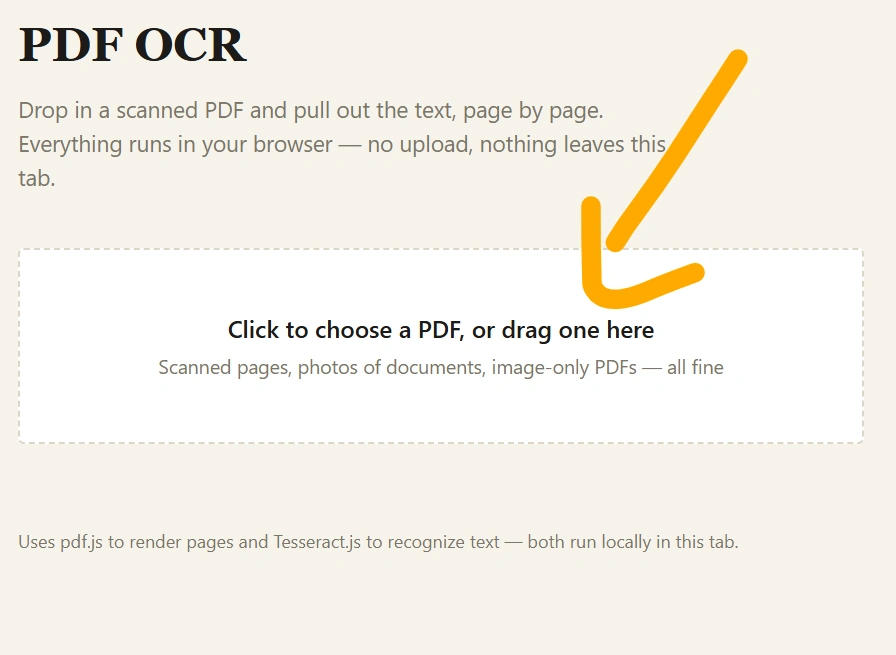
Click the upload button and choose the scanned PDF from your computer or mobile device.
Step 3: Start OCR Processing
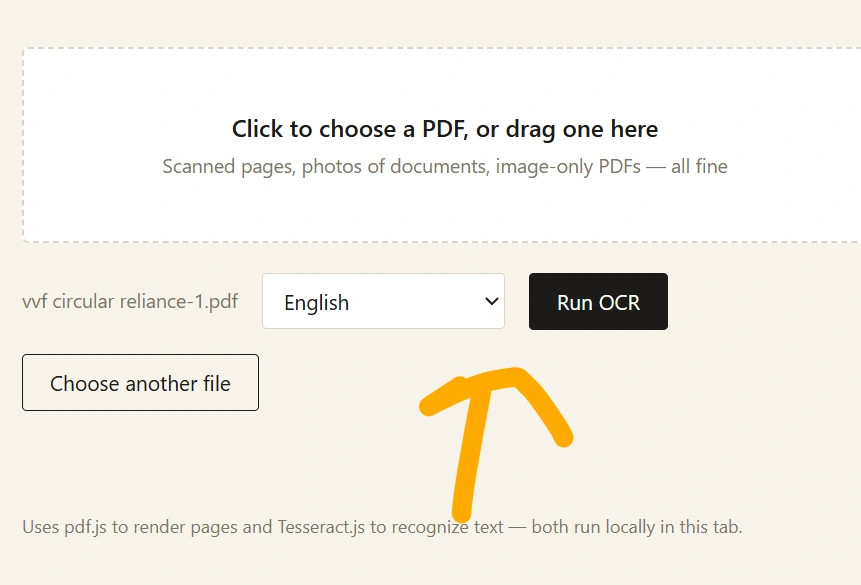
Start the OCR process. The tool will analyze the pages and attempt to recognize the text.
Step 4: Review the Result
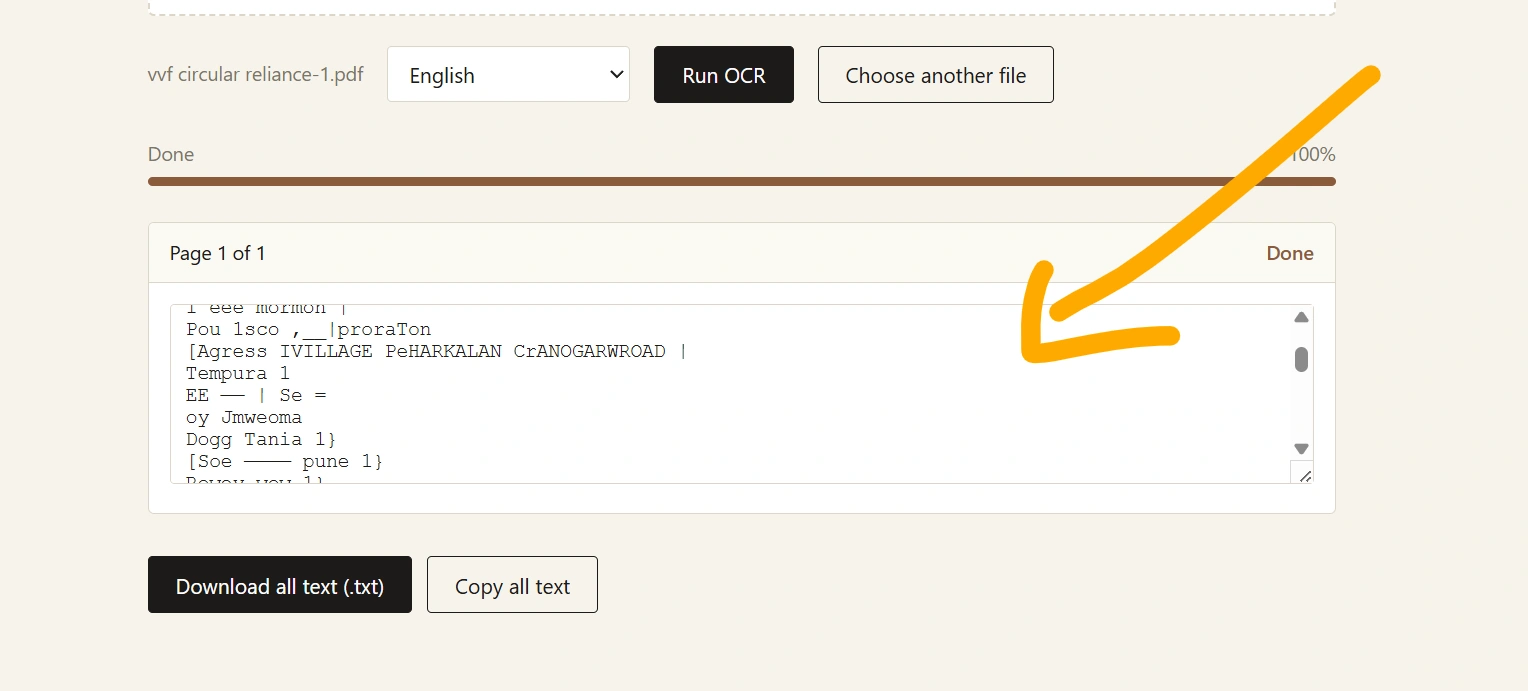
Check the converted text for accuracy, particularly if the original document is blurry, handwritten, or has an unusual layout.
Step 5: Download or Copy the Result
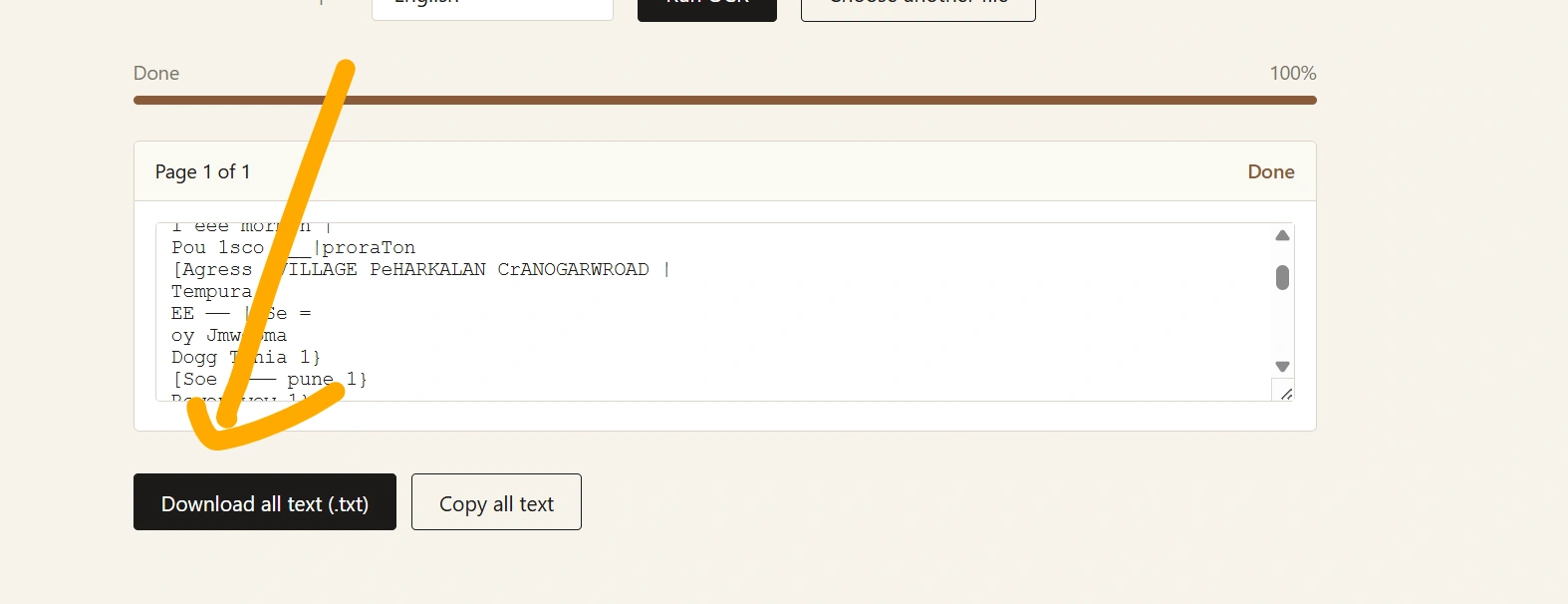
If the tool provides an output or downloadable file, save the result for later use.
PDF OCR vs. Normal PDF
Not every PDF needs OCR.
A PDF created directly from Microsoft Word, Google Docs, or another document editor usually already contains selectable text. OCR is especially useful when the PDF consists primarily of scanned images.
| Feature | Normal Text PDF | Scanned PDF with OCR |
|---|---|---|
| Text selection | Usually available | Available after OCR |
| Search text | Usually available | Available after OCR |
| Copy text | Usually available | Available after OCR |
| Created from scan | Usually no | Usually yes |
| OCR required | Usually no | Often yes |
Benefits of Using PDF OCR
Makes Scanned PDFs Searchable
One of the biggest advantages of OCR is the ability to search for specific words or phrases within a scanned document.
Instead of checking every page manually, you can search for the information you need.
Saves Time
Typing information from a large scanned document can take hours. OCR can automate much of this work.
Helps Digitize Paper Documents
Organizations and individuals can use OCR to convert physical documents into digital, searchable records.
Makes Copying Text Easier
When OCR successfully recognizes a document, you can often select and copy the text instead of manually retyping it.
Useful for Document Management
Searchable documents are easier to organize, archive, and retrieve when you need them later.
What Types of PDFs Can PDF OCR Process?
OCR works particularly well with PDFs containing clearly printed text.
Common examples include:
- Scanned office documents
- Printed letters
- Invoices
- Receipts
- Forms
- Study materials
- Newspaper scans
- Books
- Reports
- Manuals
The quality of the result depends heavily on the quality of the original scan.
How to Get Better PDF OCR Results
For better recognition, start with a high-quality PDF.
Use Clear Scans
A sharp and readable scan generally produces better OCR results than a blurry image.
Keep the Document Straight
If pages are heavily tilted or rotated, text recognition can become more difficult.
Avoid Very Low Resolution
Low-resolution scans may cause letters and numbers to blend together.
Use Good Contrast
Dark text on a clean, light background is generally easier for OCR systems to recognize.
Check the Output
OCR isn’t perfect. Always review important information such as names, dates, numbers, addresses, and financial figures.
Can PDF OCR Recognize Handwriting?
OCR is primarily designed for printed or clearly rendered text. Handwritten text is considerably more difficult to recognize and results can vary depending on the handwriting, image quality, and technology being used.
If you are processing handwritten notes, carefully check the converted result rather than assuming every word was recognized correctly.
Is PDF OCR Accurate?
The accuracy of PDF OCR depends on several factors, including:
- Image quality
- Font type
- Text size
- Page layout
- Scan resolution
- Background noise
- Document orientation
- Language
- Handwriting
A clean, high-resolution document with standard printed text can generally produce much better results than a blurry or damaged scan.
For important documents, always compare the OCR output with the original PDF.
Common PDF OCR Problems
Incorrect Characters
OCR may confuse similar characters, such as 0 and O or 1 and I, especially when the scan quality is poor.
Missing Words
Very small, blurry, or damaged text may not be recognized.
Formatting Changes
Tables, columns, images, and complex layouts may not be reproduced perfectly.
Language Recognition Issues
If the document contains a language or character set that the OCR system doesn’t support well, recognition quality may decrease.
Frequently Asked Questions About PDF OCR
What does PDF OCR mean?
PDF OCR means using Optical Character Recognition technology to identify text inside a PDF, particularly scanned or image-based PDF documents.
Can I OCR a scanned PDF?
Yes. OCR is specifically useful for scanned PDFs because the pages often contain images rather than selectable digital text.
Is PDF OCR free?
Some online PDF OCR tools offer free processing, although limits such as file size, number of pages, or daily usage may apply.
Does OCR make a PDF searchable?
Yes, when OCR successfully recognizes the text and creates a searchable text layer or another searchable output.
Can OCR extract text from images inside a PDF?
Yes. OCR can recognize printed text contained in images, provided the image quality is suitable.
Is OCR 100% accurate?
No. OCR can make mistakes, particularly with blurry scans, unusual fonts, complex layouts, and handwritten text. Important results should always be checked against the original document.
PDF OCR vs. Manually Typing Text
Manually typing a document can be accurate, but it is slow when dealing with hundreds of pages.
PDF OCR can automate much of the recognition process and is particularly useful for large collections of printed documents. However, manual proofreading may still be necessary.
The best approach for important documents is often OCR first, followed by human review.
Privacy and Security When Using Online PDF OCR
Before uploading a document to any online tool, consider whether it contains sensitive or confidential information.
Avoid uploading documents containing passwords, financial information, private records, or other sensitive data unless you understand how the service handles uploaded files.
A trustworthy tool should clearly explain its approach to file processing, storage, and deletion in its privacy policy.
Final Thoughts
PDF OCR is a useful way to turn scanned, image-based PDF documents into searchable digital text. Whether you are working with study notes, business records, old documents, invoices, or scanned books, OCR can save time and make information easier to find.
For the best results, use clear and high-quality PDFs and always review the converted text when accuracy is important.
If you frequently work with scanned documents, an easy-to-use PDF OCR online tool can be a practical addition to your everyday document workflow.
Explore Our Tools
- Resize Signature Online: Free Tool to Resize Your Signature Image
- Text Art: Create Amazing Text Art Online With Emojis
- Convert Text into PDF Online – Free, Fast & Easy Text to PDF Converter
- Text Files: Create, Edit, Open, and Download Text Files Online for Free
- Text Repeater 10000 Times – Repeat Text Online Free
- Online Clipboard – Copy, Store & Access Text Online for Free
- KB Increaser: Increase Image Size in KB Online for Free
- PDF to PNG High Quality: Convert PDF Pages into Clear PNG Images